
LGA 1155 Motherboard H61 for Intel 2th/3th Core i7/i5/i3 DDR3
5.0Editor score
Supports 2nd and 3rd Gen Intel
M.2 NVME and NGFF Interface
VGA and HDMI Video Output
Compare the top ten Lga 1155 Motherboard options for performance and value to find the right fit for your Intel system upgrade needs today.
Finding the right Lga 1155 Motherboard is essential for building a reliable desktop system. You need a board that supports your CPU and memory while offering essential connectivity options for your daily tasks.
We compared ten real products based on socket compatibility, expansion slots, and user ratings. This list covers budget-friendly options and high-end chipsets to help you choose wisely.
Each pick shows key features and real-world performance notes. Prices change often so check current listings before buying to ensure you get the best deal available right now.
5.0Editor score

4.1Editor score

4.0Editor score
This table offers a side-by-side look at all ten boards. It highlights key specs like memory support and storage interfaces so you can quickly spot the right model.



This Lga 1155 Motherboard offers a solid foundation for budget builds. It receives top ratings for reliability and compatibility with older Intel CPUs.
We may earn a commission when you buy through this link, at no additional cost to you.
The board supports Core i3, i5, and i7 processors from the second and third generations. It also allows for M.2 NVME storage which is a rare find in this price range.
While it lacks a manual and battery, these are minor issues that do not impact core performance. Most users can install drivers easily with Windows 10.
Anyone looking to save money on a retro build should consider this board. It balances cost and features better than many competitors.
The M.2 interface allows for faster boot times using NVME drives instead of older SATA SSDs.
VGA and HDMI ports are included for high definition video output without a dedicated graphics card.
We may earn a commission when you buy through this link, at no additional cost to you.
This board is designed for small form factor builds with its Flex-ATX size. It supports a wide range of processors including Xeon E3 variants.
We may earn a commission when you buy through this link, at no additional cost to you.
Users appreciate the M.2 NVME support which allows for fast storage options. The board also includes HDMI and VGA for versatile display connections.
However the rating suggests some users face issues with drivers or booting. Careful attention to CPU compatibility is needed to ensure it works.
It is a good choice for compact systems where space is limited. Just ensure your CPU has integrated graphics if you plan to use the onboard video.
The Flex-ATX size makes it ideal for smaller cases that do not fit standard ATX boards.
It supports Xeon E3 V2 processors which can offer better value for multi-tasking workloads.
We may earn a commission when you buy through this link, at no additional cost to you.
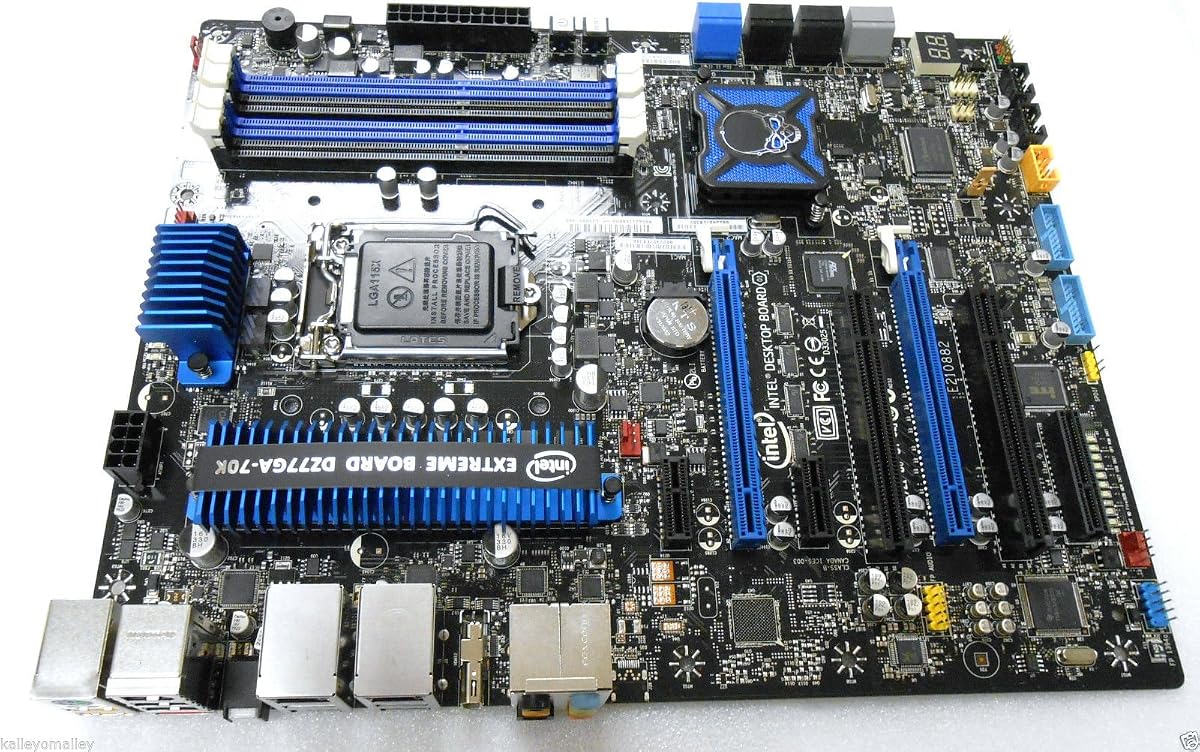
This board brings the Z77 chipset to the Lga 1155 platform. It offers strong support for overclocking and modern storage options for its era.
We may earn a commission when you buy through this link, at no additional cost to you.
Gigabit LAN ensures fast network speeds which is essential for gaming and file transfers. The ATX form factor fits most standard cases.
The RAID support allows for multiple storage drives to work together for speed or safety. This is useful for users who manage large media libraries.
Overall it is a reliable option for those needing a stable desktop. The chipset support adds value compared to lower tier H61 boards.
Gigabit LAN provides faster internet speeds than older 100M options found on budget boards.
RAID support allows users to combine drives for better performance or data protection.
We may earn a commission when you buy through this link, at no additional cost to you.
This board offers premium features like USB BIOS Flashback for easy updates. It is designed for users who want advanced control over their system.
We may earn a commission when you buy through this link, at no additional cost to you.
Wi-Fi GO! allows for remote management of your PC from other devices. This makes it convenient for home entertainment setups.
SMART DIGI+ Power Control helps optimize system stability and efficiency. It ensures your components run cool and stable under load.
For enthusiasts who value these tools this board is a great choice. It stands out for its utility features in a classic chipset.
USB BIOS Flashback lets you update firmware without a CPU or memory installed.
Wi-Fi GO! enables you to control your PC remotely using a smart device.
We may earn a commission when you buy through this link, at no additional cost to you.
This board is marketed with a gaming focus. It includes a PCIe 3.0 x16 slot for modern graphics cards.
We may earn a commission when you buy through this link, at no additional cost to you.
The layout is designed to accommodate standard gaming cases easily. HDMI and VGA outputs ensure compatibility with various monitors.
While the power supply is basic it is sufficient for most standard builds. It supports memory up to 16GB which is good for general gaming.
If you want a dedicated gaming look at an affordable price this is a solid pick. It balances cost and performance well for casual gamers.
The PCIe 3.0 x16 slot ensures your graphics card can run at full speed.
Multiple output options allow you to connect different types of displays.
We may earn a commission when you buy through this link, at no additional cost to you.
This board focuses on energy efficiency and smart power management. DIGI+ VRM helps ensure stable power delivery to the CPU.
We may earn a commission when you buy through this link, at no additional cost to you.
USB 3.0 Boost technology improves read and write speeds on external drives. This is useful for users who rely on USB storage.
Fan Xpert allows for automatic fan control based on system load. This keeps your system quiet when idle and cool when busy.
It is a good choice for office or home use where stability matters. The energy features help save power over time.
USB 3.0 Boost allows for faster data transfers on external devices.
Fan Xpert adjusts fan speeds to reduce noise when performance is not needed.
We may earn a commission when you buy through this link, at no additional cost to you.
This board supports Turbo Boost 2.0 for dynamic performance scaling. It is ideal for users who want to maximize their CPU potential.
We may earn a commission when you buy through this link, at no additional cost to you.
With support for 32 GB of memory it handles heavy multitasking well. The SATA 3 ports ensure fast storage connections for SSDs.
It offers a balance of features and stability that makes it a top pick. Users report good reliability with long-term use.
For those needing high memory capacity this is a strong option. It delivers consistent performance for demanding workloads.
Turbo Boost 2.0 adjusts clock speeds automatically based on current demand.
Supporting 32 GB allows for heavy multitasking and large applications.
We may earn a commission when you buy through this link, at no additional cost to you.
This board offers dual x16 PCIe slots for multi graphics card setups. It is designed for users who need significant graphical power.
We may earn a commission when you buy through this link, at no additional cost to you.
Support for up to 32 GB of RAM ensures you have enough memory for intensive tasks. The Z77 chipset supports overclocking well.
RAID options allow for flexible storage configurations. You can prioritize speed or redundancy based on your needs.
If you need high-end expansion this board fits the bill. It is a solid choice for power users and gamers.
Dual PCIe slots let you run multiple graphics cards for better performance.
The Z77 chipset supports overclocking to boost CPU speeds beyond stock limits.
We may earn a commission when you buy through this link, at no additional cost to you.
This board is known for its robust design and connectivity. It features dual Gigabit LAN ports for networking flexibility.
We may earn a commission when you buy through this link, at no additional cost to you.
PCIe 3.0 support ensures your hardware can run at the fastest available speeds. Realtek HD Audio provides clear sound for entertainment.
It is a favorite for users who want the best possible connectivity options. The build quality is often praised by enthusiasts.
If you find this board in stock it is a great choice. It offers premium features that are hard to find elsewhere.
Dual LAN ports allow for failover or dedicated network connections.
Realtek HD Audio delivers high fidelity sound for music and games.
We may earn a commission when you buy through this link, at no additional cost to you.
This board is designed with business and home use in mind. It features EPU technology to save energy during light tasks.
We may earn a commission when you buy through this link, at no additional cost to you.
UEFI BIOS offers a graphical interface that is easier to use than old text based systems. This makes setup straightforward for new users.
GPU Boost helps improve integrated graphics performance without extra costs. It is useful for systems without a dedicated graphics card.
It is a reliable option for those who need stability and simplicity. The energy saving features make it efficient for daily use.
EPU saves energy by adjusting power use based on system load.
UEFI BIOS allows you to manage settings with a modern graphical interface.
We may earn a commission when you buy through this link, at no additional cost to you.
Choosing the right board involves checking compatibility and features. This guide explains the key factors to consider.
Ensure the board matches your CPU generation. Lga 1155 supports 2nd and 3rd gen Intel Core processors.
Check the CPU list before buying to avoid compatibility issues.
Most boards support DDR3 memory up to 16 or 32 GB. Verify the max capacity for your needs.
Choose a board that meets your RAM requirements for smooth performance.
Look for SATA 3 ports and M.2 slots for faster drives. Some boards lack M.2 support.
Modern storage options improve boot and load speeds significantly.
Check for HDMI or VGA ports if you do not use a graphics card. Ensure your CPU has integrated graphics.
VGA and HDMI are standard for most Lga 1155 boards.
Gigabit LAN is preferred over 100M for fast internet. Some budget boards still use slower LAN.
Choose Gigabit LAN for better network performance.
Stable power is key for system reliability. More phases usually mean better stability.
Select a board with adequate power for your CPU load.
ATX boards fit most cases but Flex ATX is smaller. Measure your case before buying.
Choose a size that fits your PC chassis properly.
Some boards offer BIOS Flashback for easy updates. This helps keep your system secure.
Consider BIOS tools if you plan to update often.
Install the CPU gently into the socket without applying pressure. Secure the lever to lock it in place.
Connect power cables to the motherboard before turning on the system. Ensure all connections are tight and secure.
Clean dust regularly with compressed air to prevent overheating. Keep the case well ventilated for airflow.
Yes most Lga 1155 boards support 3rd Gen Ivy Bridge processors. Check BIOS updates for full compatibility with specific models.
No Lga 1155 only supports DDR3 memory. DDR4 is not compatible with this socket or chipset.
Most boards support up to 32 GB of DDR3 RAM. Some budget models may be limited to 16 GB.
M.2 is rare on older boards but some newer budget options include it. Check the product details for M.2 slots.
Not if your CPU has integrated graphics. Boards with VGA or HDMI allow display output without a GPU.
H61 boards generally do not support CPU overclocking. You need Z77 or Z68 boards for overclocking features.
A standard 400 to 500 watt supply is enough for most builds. Check your GPU power needs if you have one.
They are widely available on marketplaces but often used or refurbished. New stock is limited compared to modern parts.
The top picks offer great value for budget and performance builds. Each board supports the core features you need.
Focus on CPU and memory compatibility first to ensure your system works. Choose a board with the ports you require.
Check current listings for the best deal. Prices change often so verify specs before you buy.