
Torjim 12 Inch Video Light Kit
4.5Editor score
Complete kit with stands
Adjustable color temp
Portable two light setup
Live streaming has become a vital way for creators to connect with audiences daily. Good lighting ensures your face is visible and your colors look true. Without proper lights your stream can appear dark or blurry to viewers on mobile devices.
We compared ten real products based on brightness color range and ease of use. Each item was evaluated for its ability to handle indoor streaming and video calls. We looked at features like app control and battery options to find the best setups.
Each pick shows specific strengths like portability or high output for large rooms. Note that prices and stock change often on major retail sites. Check current availability before buying to ensure you get the right gear for your studio.
4.5Editor score
4.6Editor score

4.7Editor score
As an Amazon Associate we earn from qualifying purchases.
The following table lists each product with key specs for easy side-by-side viewing. Use this to quickly find the right light for your streaming needs.





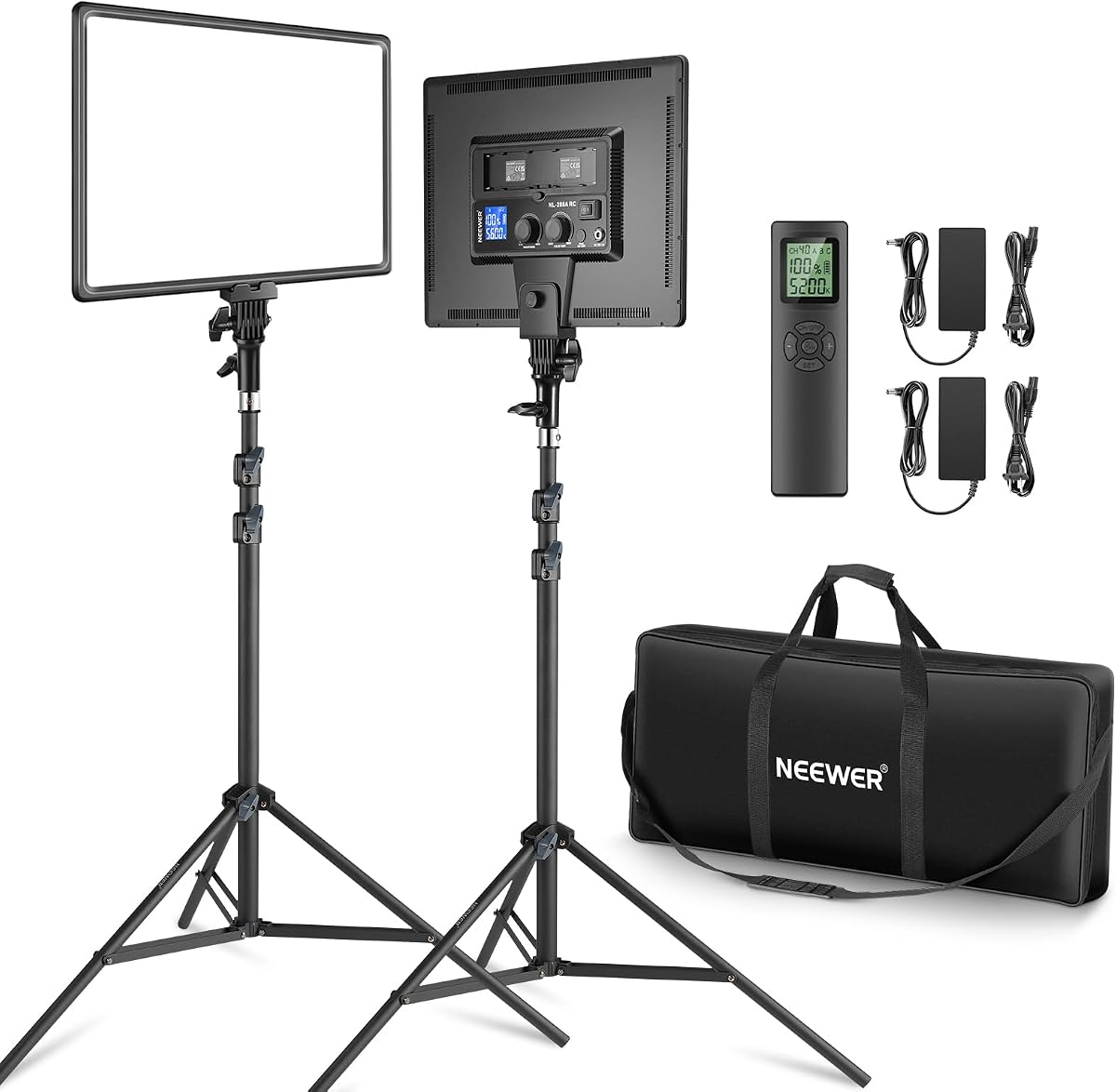
The Neewer 18 Inch LED Video Light Panel stands out as the top choice for serious streamers. It earns a 4.6 rating from users who value its high output and consistent color. This kit includes two 45W panels that deliver soft continuous light without flicker.
We may earn a commission when you buy through this link, at no additional cost to you.
Its high CRI of 97 plus ensures that skin tones and product colors look natural on camera. The remote control lets you change settings from across the room which is useful during live shows. You can also use Sony NP-F batteries for outdoor or backup power.
While this kit costs more than entry options it offers long term value due to its power and durability. The weight is noticeable but necessary for stability during long sessions. Most users find the extra cost worth the quality difference.
Buy this if you need reliable studio grade light for professional streams or content. It handles complex setups well and grows with your skills over time. This is the best all round kit for dedicated creators.
The 97 plus CRI rating means colors appear true to life on your broadcast.
The remote lets you adjust lights without touching them during recording.
We may earn a commission when you buy through this link, at no additional cost to you.
This Torjim kit is an excellent starting point for new streamers on a budget. It rates 4.5 stars for its ability to brighten dark rooms without breaking the bank. The two pack design gives you coverage for both sides of your desk.
We may earn a commission when you buy through this link, at no additional cost to you.
Each light offers 30W of brightness which solves dim lighting issues effectively. You get tripods and phone holders right in the box so you can start filming fast. The controller on the cord lets you adjust brightness without moving your hands.
It is not as powerful as higher end lights but works well for home studios. The build is lighter and less durable but fine for stationary setups. Users appreciate the clear instructions and quick assembly process.
Choose this kit if you want a complete solution under a tight budget. It removes the guesswork of buying separate stands and lights. It is a smart first step for anyone starting their streaming journey.
Everything you need including stands and bags comes in one box.
The carrying bag makes it easy to move lights between rooms.
We may earn a commission when you buy through this link, at no additional cost to you.
The NEEWER 660 PRO II brings advanced color control to live streaming. With a 4.7 rating it is praised for its full RGB range and consistent power. This light shines bright with 50W output and no flicker or color shifts.
We may earn a commission when you buy through this link, at no additional cost to you.
You can use a smart app to control settings from your phone. This lets you save presets for different shows or guests. The preset scenes like party or police car add creative flair to your background lighting.
The cooling system keeps the light cool even during long streams. While pricey the versatility of color and power makes it a top tier tool. It replaces many separate colored gels with a single unit.
Invest in this if you want creative lighting options beyond standard white light. It suits influencers and artists who need dynamic visual effects. It is a premium upgrade for advanced streaming setups.
Adjustable 360 degree color allows for unique background effects.
Control multiple lights from your smartphone with ease.
We may earn a commission when you buy through this link, at no additional cost to you.
This kit offers high color accuracy with a CRI of 97 plus. Users rate it 4.4 stars for its ability to render true colors in videos. Each panel uses 356 LED beads to create a stable and ample light.
We may earn a commission when you buy through this link, at no additional cost to you.
The USB-C power option is great for setups near computers or power banks. You can plug into a laptop or portable charger without needing wall outlets. This adds flexibility for desk based streaming and tight spaces.
It does not have as much raw power as the 45W lights. However for close up shots it provides plenty of illumination. The design is compact and fits well in small home studios.
Pick this if you value color fidelity and portability over raw power. It works well for podcasting or product reviews where colors matter. It is a smart choice for desk setups.
High CRI ensures products and skin look accurate on camera.
Power with a phone charger or laptop for mobile use.
We may earn a commission when you buy through this link, at no additional cost to you.
The UBeesize kit delivers strong light with 3000 lumens per panel. It scores 4.4 stars for reliability in home video setups. The 26W output helps fix dark faces and blurry product details effectively.
We may earn a commission when you buy through this link, at no additional cost to you.
Included phone holders allow hands free filming which is great for tutorials. The aluminum tripods extend up to 72 inches for flexible height adjustment. You can tilt the lights 180 degrees for precise angle control.
Users note the light is bright enough for most indoor rooms. The design is simple but functional for daily use. It is a solid middle ground between cheap and pro gear.
Choose this for balanced performance without high costs. It suits creators who need stable lighting and phone support. It is a reliable tool for daily content creation.
3000 lumens provide strong light even in large rooms.
The included phone holder helps secure your device during shoots.
We may earn a commission when you buy through this link, at no additional cost to you.
The Logitech Litra Glow is built for desktop users and webcam streams. It has a 4.5 rating for its ability to improve video call quality. The frameless diffuser provides soft light that eliminates harsh shadows.
We may earn a commission when you buy through this link, at no additional cost to you.
It mounts directly on your monitor so it stays aligned with the camera. The TrueSoft technology delivers balanced full spectrum light for natural skin tones. You can use the G HUB app to save lighting presets.
It is not meant for large room fill but perfect for desk work. The USB power keeps cable clutter low and safe for daily use. It is the best option for office and laptop setups.
Buy this if you stream from a fixed desk or laptop. It simplifies your setup and ensures consistent lighting every time. It is a top choice for professionals working from home.
The 3-way mount fits most screens for consistent light placement.
Control brightness and color from your desktop computer.
We may earn a commission when you buy through this link, at no additional cost to you.
This COB light is a powerhouse for large studios and professional setups. It holds a 4.7 rating for its massive 52500lux output and high color index. The light can brighten entire rooms without loss of quality.
We may earn a commission when you buy through this link, at no additional cost to you.
It supports DMX and app control for complex multi light setups. The Bowens mount lets you attach modifiers like softboxes or reflectors. This allows for fine tuning of shadows and light spread.
While powerful it is large and needs a sturdy stand. The cooling fan is quiet but the unit is heavier than panels. It is best for dedicated studios where space is not an issue.
Choose this for professional streaming or large room coverage. It outperforms standard panels in sheer output and flexibility. It is a top grade tool for serious production.
52500lux allows lighting of large spaces with one unit.
Compatible with standard modifiers for custom light shaping.
We may earn a commission when you buy through this link, at no additional cost to you.
This lighting is a compact ring design for desk and laptop use. It rates 4.4 stars for reducing glare and eye strain during calls. The edge-lit tech creates a soft even light across your face.
We may earn a commission when you buy through this link, at no additional cost to you.
The height adjusts from 22 to 32 inches for comfort. A rotating phone holder makes it useful for mobile filming too. It fits well on smaller desks without taking up much space.
It provides enough light for close up webcams and calls. The design is sleek and modern to match office setups. It is great for users who want a clean look.
Buy this for small desks and video conference use. It improves your look without complex setups. It is a practical choice for remote work.
Uniform illumination reduces eye strain during long calls.
Compact ring shape leaves more room on your desk.
We may earn a commission when you buy through this link, at no additional cost to you.
This kit uses large softboxes for traditional photography and video. It holds a 4.4 rating for creating even and shadow free lighting. The 16 by 16 size provides a wide area of soft illumination.
We may earn a commission when you buy through this link, at no additional cost to you.
The silver baffles inside help spread light evenly. You get two tripods with independent locking knobs for stability. The rotatable head lets you adjust angles for specific scenes.
It is more complex to set up than panel lights. However the soft look is classic and flattering for portraits. It is great for studio corners where panels might be too harsh.
Choose this for a classic soft light look in your stream. It is best for seated video or interview style content. It is a great upgrade for portrait quality.
Softbox design eliminates hard shadows on faces.
16 by 16 size covers a wide range of subjects.
We may earn a commission when you buy through this link, at no additional cost to you.
This is a single version of the Torjim softbox kit. It shares the same 4.4 rating and large size as the two pack. It provides a large soft light for key or fill lighting.
We may earn a commission when you buy through this link, at no additional cost to you.
It comes with one tripod and one softbox to start. The energy efficient bulb keeps heat and cost down. It is a great way to try softbox lighting without a big kit.
The light is bright enough for close up shots. The design is simple and easy to move around. It is ideal for adding soft light to a panel setup.
Buy this if you need one main light at a low cost. It is a smart budget pick for key lighting. It grows with your setup as you add more lights.
Single unit offers softbox benefits at a low price.
The fabric cover softens light for natural skin tones.
We may earn a commission when you buy through this link, at no additional cost to you.
Choosing the right LED lighting involves more than just picking a bright light. You must consider your space budget and the type of content you create.
Brightness is measured in watts or lumens. Higher wattage means more light which is useful for large rooms. Look for at least 30W per panel for decent coverage. Brighter lights help you use lower camera gain for clearer video.
Prioritize higher wattage if your room has dark corners. Low output lights may leave your face dim even when set to max.
CRI tells you how true colors appear under the light. A CRI of 97 plus is ideal for accurate skin tones. Lower CRI lights can make products look off color on stream. Check the CRI before buying to ensure quality.
Always choose a high CRI light for professional results. It prevents color correction headaches during editing.
Color temperature sets the mood from warm to cool. A range of 3000K to 6500K gives you flexibility. Warm light suits evening streams while cool light matches daylight. Adjustable temp helps you match background lights.
Look for lights that offer a wide range. This lets you adapt to different times of day easily.
If you move your setup often choose lighter panels. Heavy lights can strain stands or tripods. Check the fold size and weight for travel. Portable kits often include carry bags for storage.
Prioritize light weight if you stream from different rooms. It makes setup and breakdown much faster.
Some lights run on AC power while others use batteries. Battery power is great for backup or outdoor use. AC is better for long streams. Check if the kit includes power adapters.
Choose dual power options for flexibility. It lets you keep shooting if a power outlet is far.
Look for remote control or app support. This lets you change settings without walking to the light. Bluetooth and DMX options add advanced control. Wired remotes are reliable and simple.
Prioritize app or remote if you edit mid-stream. It saves time and keeps your focus on the content.
The stand must hold your light steady. Aluminum tripods are sturdy and resist wobble. Check the max height to ensure eye level. Good mounts adjust angles easily for best position.
Choose a sturdy stand to avoid falls. A good mount is as important as the light itself.
Softboxes or diffusers help spread light evenly. They reduce harsh shadows under eyes and nose. Panels may need add-ons but softboxes include them. Look for kits with built-in diffusion.
Prioritize diffused light for portraits. It flatters skin and creates a professional look.
Place your key light at eye level and 45 degrees from your face. This angle creates flattering shadows and depth. Use a fill light on the opposite side to soften shadows. Ensure your camera faces the light source directly.
Adjust brightness to match your room. If your face is too bright lower the power. If it is dark increase the output. Test different settings before going live. Use app presets to save your favorite looks for easy access.
Clean the panels with a dry cloth to remove dust. Dust can reduce brightness and cause uneven light. Do not use water on the electronics. Store lights in their bags to protect them from scratches and impact.
Yes high CRI ensures colors like red and blue look real on screen. Low CRI lights make your skin look washed out. Aim for 95 plus for best results. It is a key metric for quality.
Yes most of these lights work well for Zoom and Teams. They help fix dark rooms and improve image quality. Desktop lights are easier to use for calls. Large panels are better for full room video.
For most homes 30W to 45W per light is enough. This covers standard rooms without glare. Higher wattage is needed for large studios. Choose based on your room size.
LED lights stay cooler than old bulbs. They still warm up during long sessions. High end lights have fans to cool down. Check heat specs if you plan to use them for hours.
The Logitech Litra Glow or Zoom lighting fit small desks well. They mount directly on monitors to save space. You do not need extra tripods for these. They are compact and easy to use.
Panels are portable and easier to set up. Softboxes give softer and wider light. Use panels for mobile streaming. Use softboxes for fixed studio setups. It depends on your space.
Use a remote or app to change settings. Some apps let you save presets for different shows. This avoids touching the light during the broadcast. Wireless control keeps you focused on the viewer.
Most of the kits here include tripods with the lights. They are part of the bundle to save money. Check the package list to be sure. Some premium lights may sell stands separately.
We found the Neewer 18 Inch Panel the top pick for its balance of power and control. It suits most creators who want professional results. The Torjim 12 Inch Kit is the best budget option for starters.
When choosing prioritize brightness and color accuracy over extra features. A high CRI and good wattage will make a bigger difference than RGB colors. Choose a light that matches your room size.
Always check current prices and stock before buying. Deals change often on Amazon and other sites. Select the gear that fits your space and budget. Happy streaming with the right light.