
HP Chromebook 14 x360 Plus
4.2Editor score
Flexible 2-in-1 design
Crisp WUXGA touchscreen display
Long battery life for daily tasks
Finding the right laptop can be challenging when you want the sleek design and reliability of a MacBook without the premium price tag. This guide explores ten diverse options ranging from budget-friendly Chromebooks to powerful Windows machines that deliver exceptional performance for everyday tasks.
We evaluated each device based on build quality, display clarity, battery life, and overall value to ensure you get the best experience possible. Our team analyzed technical specifications, user feedback, and real-world usage scenarios to provide a comprehensive ranking that suits various needs and preferences.
Each pick highlights specific strengths and ideal use cases to help you make an informed decision quickly. Please note that prices and availability can change frequently so always check the latest details before purchasing your new computing device.
4.2Editor score

4.6Editor score

4.4Editor score
As an Amazon Associate we earn from qualifying purchases.
The following table provides a side-by-side comparison of all ten selected laptops highlighting their key specifications to help you quickly identify the model that fits your specific requirements.


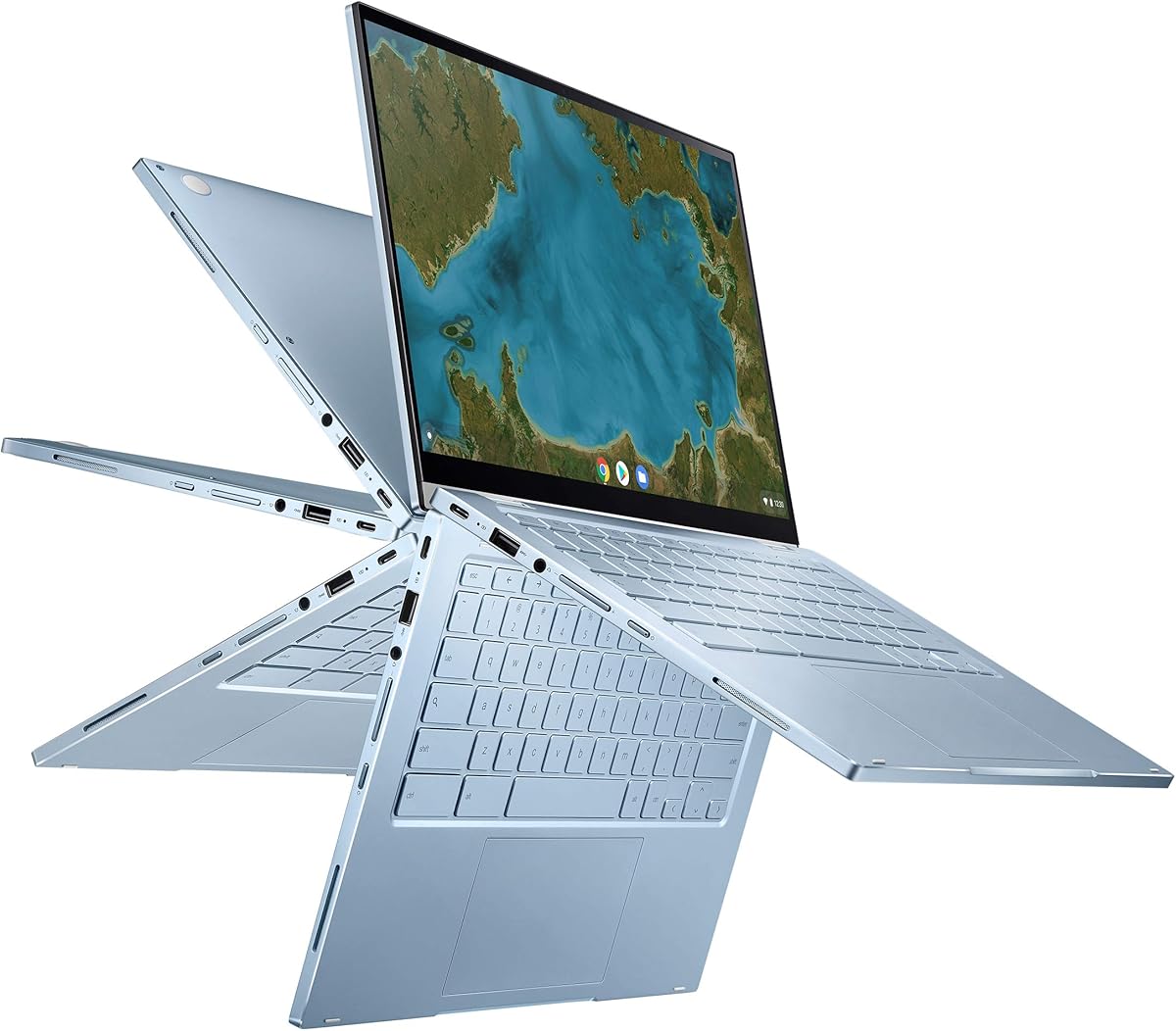


The HP Chromebook 14 x360 Plus stands out as an incredibly affordable option for students and families seeking a versatile laptop. With a rating of 4.2 stars it offers a balanced mix of features that cover everyday computing needs without breaking the bank. Its standout quality lies in its flexible 2-in-1 design that allows you to use it as a tablet or tent mode for media consumption.
We may earn a commission when you buy through this link, at no additional cost to you.
This device features a crisp 14-inch WUXGA touchscreen with narrow borders that maximizes screen real estate for productivity tasks. Powered by the Intel N150 processor and equipped with 4GB LPDDR5 memory it handles web browsing document editing and video streaming with ease. The MIL-STD 810H certification ensures it can withstand the rigors of daily use in schools or homes making it a reliable choice for kids.
While the 128GB UFS storage may feel limited for storing large media libraries the device relies heavily on cloud integration which is typical for ChromeOS. The processor is sufficient for light multitasking but may slow down if you have too many tabs open simultaneously. These trade-offs are acceptable given the low price point and the device delivers strong value for basic computing.
If you are looking for a cost-effective machine for online classes homework or casual entertainment this Chromebook is an excellent choice. It provides all the essential tools needed for learning and browsing while maintaining a durable build that lasts. We recommend it for students who need a portable and reliable device without investing in premium hardware.
The 360-degree hinge enables four versatile modes including laptop tent stand and tablet to adapt to any situation.
Built to withstand rigorous testing this laptop ensures dependable performance across diverse working environments for kids.
We may earn a commission when you buy through this link, at no additional cost to you.
The ASUS Chromebook Flip CX1 offers a robust set of features that appeal to users needing reliable performance for daily tasks. With a rating of 4.3 stars it combines a convertible design with sufficient power for multitasking and media consumption. Its standout quality is the inclusion of 8GB RAM which is rare in this price range and ensures smoother operation compared to competitors.
We may earn a commission when you buy through this link, at no additional cost to you.
Powered by the Intel Celeron N4500 processor this laptop handles web browsing and document editing efficiently. The 14-inch FHD NanoEdge touchscreen provides clear visuals and the 360-degree hinge allows for flexible positioning during work or play. Users also benefit from a generous 3 months of Google One AI Premium including Gemini Advanced and cloud storage which adds significant value.
Despite its strengths the device uses eMMC storage which is slower than traditional SSDs and may limit speed for file transfers. The processor is adequate for light tasks but might struggle with heavy workloads like video editing. However these limitations are acceptable for casual users who prioritize portability and cloud-based workflows over raw local performance.
This model is ideal for students and professionals who need a durable and versatile laptop for everyday use. The long battery life ensures you can work through a full day without carrying a charger. We recommend it for those who value flexibility and need a reliable machine for remote learning or office work.
With 8GB of RAM this device supports multiple applications and browser tabs running simultaneously without slowdown.
Includes 2x USB-C and 2x USB-A ports alongside a Micro SD reader for versatile peripheral support.
We may earn a commission when you buy through this link, at no additional cost to you.
The Samsung Galaxy Book4 Business Laptop delivers premium performance ideal for professionals requiring robust computing power. With a rating of 4.4 stars it excels in productivity tasks thanks to its high-end specifications. The standout quality is the 10-Core Intel Core 7 150U processor combined with 16GB of RAM ensuring seamless handling of complex software and large datasets.
We may earn a commission when you buy through this link, at no additional cost to you.
The 15.6-inch FHD IPS display offers bright and color-accurate visuals making it suitable for creative work and media consumption. It includes a full-size backlit keyboard with a numpad and a fingerprint reader for enhanced security and comfort during long typing sessions. Connectivity is comprehensive with USB-C USB-A HDMI and a LAN port ensuring compatibility with all peripherals.
Weighing 3.46 lbs it is heavier than typical ultrabooks which may impact portability for frequent travelers. Battery life is rated up to 12 hours but may decrease under demanding workloads such as rendering or streaming. These trade-offs are acceptable given the raw performance and connectivity options it offers for business environments.
If you need a powerful machine for business analytics data processing or extensive multitasking this laptop is an excellent choice. It provides the reliability and features needed for professional work while maintaining a polished design. We recommend it for users who prioritize performance and connectivity over ultra-lightweight portability.
The 10-Core processor delivers fast and efficient task execution for complex professional applications.
Features LAN HDMI and multiple USB ports to support diverse peripherals without needing dongles.
We may earn a commission when you buy through this link, at no additional cost to you.
The Google Pixelbook Go is designed for users who prioritize portability and battery life above all else. With a rating of 4.2 stars it offers a sleek and efficient computing experience. Its standout quality is the lightweight design at barely 1kg making it incredibly easy to carry anywhere without adding bulk to your bag.
We may earn a commission when you buy through this link, at no additional cost to you.
Powered by an 8th Gen Intel Core processor it starts up in seconds and delivers smooth performance for web tasks. The backlit Hush Keys keyboard provides a quiet and comfortable typing experience which is ideal for shared environments. Dual stereo speakers ensure high-quality audio for media playback and video calls enhancing the overall user experience.
While it lacks a touchscreen on certain configurations the trackpad is spacious and accurate for navigation. The base model may have limited storage compared to modern standards but cloud storage integration mitigates this issue. These trade-offs are acceptable given the device's focus on travel-friendly design and long-lasting battery performance.
If you frequently travel or commute and need a reliable laptop for productivity this device is a strong contender. It combines a professional look with practical features that support uninterrupted work throughout the day. We recommend it for professionals and students who value portability and long battery life in their daily routine.
Weighing just 1kg and 13mm thin it is one of the most portable laptops available for on-the-go use.
Hush Keys reduce typing noise while a spacious trackpad ensures precise and accurate navigation.
We may earn a commission when you buy through this link, at no additional cost to you.
The Lenovo Flex 14 2-in-1 offers a versatile computing solution for those who need Windows compatibility and creative tools. With a rating of 4.4 stars it delivers reliable performance for work and entertainment. Its standout quality is the inclusion of an active pen which allows for drawing and note-taking directly on the touchscreen display.
We may earn a commission when you buy through this link, at no additional cost to you.
Powered by the AMD Ryzen 5 3500U processor and 12GB DDR4 RAM it handles multitasking and media editing efficiently. The 256GB NVMe SSD ensures fast boot times and file access while the privacy shutter provides physical security for your webcam. The flexible 2-in-1 design allows you to adapt the laptop to various usage scenarios seamlessly.
The device comes with Windows 10 which may lack the latest features found in newer operating systems. Battery life is decent but may vary depending on usage intensity and brightness settings. These trade-offs are acceptable given the inclusion of the pen and solid hardware specs that support creative tasks.
If you are a student or professional who needs to annotate documents or create digital art this laptop is an excellent choice. It combines the flexibility of a tablet with the productivity of a full Windows machine. We recommend it for users who value stylus input and robust multitasking capabilities.
Draw or take notes directly on the screen with the included active pen for enhanced creativity.
A built-in true block privacy shutter allows you to physically close the webcam when not in use.
We may earn a commission when you buy through this link, at no additional cost to you.
The ASUS Chromebook Flip C433 is designed for users who want a sleek and responsive Chromebook for daily tasks. With a rating of 4.3 stars it offers a premium feel at an affordable price. Its standout quality is the 14-inch FHD NanoEdge display which provides a large screen area within a compact body for enhanced productivity.
We may earn a commission when you buy through this link, at no additional cost to you.
Powered by the Intel Core m3-8100Y processor and 8GB LPDDR3 RAM it handles everyday web and app tasks with ease. The backlit keyboard allows for comfortable typing in dim environments and the 360-degree hinge supports multiple modes. ChromeOS ensures fast boot times and automatic security updates keeping your device protected effortlessly.
Storage is limited to 64GB eMMC which may require frequent cloud management for larger files. The processor is efficient for light use but may struggle with heavy multitasking or complex workloads. These trade-offs are acceptable for users who primarily rely on web-based applications and cloud storage solutions.
If you need a portable and stylish laptop for browsing and learning this Chromebook is a great option. It balances design and performance well for everyday computing needs. We recommend it for users seeking a reliable and compact device for travel or home use.
Ultra-narrow bezels maximize screen real estate giving you more workspace in a compact footprint.
Powered by Intel Core m3 for snappy performance and fast app launching on ChromeOS.
We may earn a commission when you buy through this link, at no additional cost to you.
The Lenovo Flagship Chromebook targets students and families with an affordable and efficient computing solution. With a rating of 4.2 stars it provides essential features for learning and browsing. Its standout quality is the MediaTek Kompanio 520 processor designed for class-leading battery life and reliable connectivity.
We may earn a commission when you buy through this link, at no additional cost to you.
The 14-inch FHD touchscreen offers wide viewing angles and clarity for media consumption. A privacy shutter ensures webcam security and the device remains slim and light for easy transport. ChromeOS offers built-in protection and cloud backups making it a secure choice for online classes and homework.
The 4GB RAM is sufficient for basic browsing but may slow down with many tabs open. Storage is limited to 64GB which may require cloud management for larger files. These trade-offs are acceptable for users focused on cloud-based tasks and budget-friendly daily computing needs.
If you need a simple and reliable laptop for online learning this device is a strong choice. It balances cost and performance well for everyday educational use. We recommend it for students who need a dedicated machine for remote learning and digital assignments.
Designed for battery life and fast connectivity to keep you productive throughout the day.
Integrated privacy shutter protects your webcam and ChromeOS offers built-in virus protection.
We may earn a commission when you buy through this link, at no additional cost to you.
The Apple 2026 MacBook Neo 13-inch combines premium design with powerful AI capabilities for modern productivity. With a rating of 4.6 stars it stands out as a top choice for professionals and students. Its standout quality is the A18 Pro chip which handles everyday tasks and AI tools with exceptional efficiency and speed.
We may earn a commission when you buy through this link, at no additional cost to you.
The device features a vibrant Liquid Retina display that supports a billion colors for crisp text and media. With up to 16 hours of battery life you can work all day without worrying about charging. macOS ensures apps run lightning fast and integration with iPhone enhances productivity by allowing seamless file sharing and control.
Base storage is 256GB which may limit local file capacity for heavy media users. Port selection is minimal and may require adapters for legacy peripherals. These trade-offs are acceptable given the exceptional battery life and performance that support all-day productivity.
If you need a reliable and powerful laptop for work and creativity this MacBook is an excellent choice. It balances performance and portability better than many competitors. We recommend it for users who value long battery life and seamless ecosystem integration.
Apple Intelligence helps you write express yourself and get things done effortlessly with privacy protections.
Up to 16 hours of battery life keeps you powered through early morning to late night sessions.
We may earn a commission when you buy through this link, at no additional cost to you.
The Apple 2021 MacBook Pro with M1 Max offers immense power for professional workflows requiring high resources. With a rating of 4.4 stars it is a solid choice for intensive tasks. Its standout quality is the 64GB RAM and 2TB SSD storage providing unmatched capacity for video editing and virtualization.
We may earn a commission when you buy through this link, at no additional cost to you.
Powered by the M1 Max chip it delivers raw performance that handles complex tasks with ease. The 14-inch Retina display provides accurate colors and sharp text for creative work. As a renewed product it offers significant savings while ensuring the device exceeds 80% battery capacity and passes professional inspection.
It is heavier than newer MacBook models and the price is higher than standard configurations. These trade-offs are acceptable for professionals who need extreme specs and cannot compromise on capacity or speed.
If you are a creative professional needing top-tier specs this MacBook is a powerful option. It offers the capability to handle heavy workloads without slowing down. We recommend it for users who need maximum performance and storage for professional projects.
64GB RAM and 2TB SSD ensure you can run heavy apps and store large projects locally.
Professionally inspected and tested to ensure reliable performance with significant cost savings.
We may earn a commission when you buy through this link, at no additional cost to you.
The Apple MacBook Pro Renewed offers an affordable entry point into the macOS ecosystem with solid specs. With a rating of 3.7 stars it provides value for budget-conscious buyers. Its standout quality is the combination of 16GB RAM and 512GB storage which ensures decent performance for daily workloads.
We may earn a commission when you buy through this link, at no additional cost to you.
Powered by an Intel Core i7 processor it handles web browsing and document editing efficiently. The 15-inch Retina display provides a large workspace and vibrant visuals. As a renewed unit it undergoes professional inspection to ensure it functions well and offers significant savings.
The Intel processor is older and may not offer the battery efficiency of newer Apple Silicon chips. These trade-offs are acceptable for users who need macOS but have budget constraints and prioritize storage and RAM over battery life.
If you need a reliable Mac for work and have a limited budget this model is a strong option. It provides the necessary tools for productivity without a premium price tag. We recommend it for users prioritizing storage and RAM over portability and battery life.
Get access to a robust Mac ecosystem and 16GB RAM at a renewed price point.
The unit undergoes professional inspection to ensure it meets functional standards.
We may earn a commission when you buy through this link, at no additional cost to you.
Selecting the right laptop involves balancing performance specifications and features with your specific needs and budget constraints.
Decide whether you prefer ChromeOS for simplicity and speed or Windows for broader software compatibility. ChromeOS is ideal for web-based tasks and lightweight use while Windows offers more flexibility for legacy applications.
Choose the OS that aligns with your daily workflow and required software applications.
Processors determine how well a laptop handles multitasking and complex applications. Look for at least an Intel Core i5 or AMD Ryzen 5 for smooth performance or equivalent Chromebook processors.
Ensure the processor matches the intensity of your tasks to avoid lag.
RAM impacts multitasking capability while storage determines how many files you can keep locally. Aim for 8GB RAM minimum and 256GB storage for a balanced experience.
More memory ensures smoother operation when running multiple apps simultaneously.
A high-resolution display improves readability and visual accuracy which is crucial for creative work and long sessions. Look for IPS panels and Full HD or higher resolution.
Prioritize screen clarity to reduce eye strain during extended use.
Long battery life is essential for students and professionals on the go. Aim for laptops offering at least 10 hours of real-world usage.
Check real-world reviews as official ratings may vary.
Weight and size matter if you carry your laptop frequently. Lightweight devices under 3 lbs are ideal for commuting and travel.
Balance portability with screen size based on your mobility needs.
Ensure the laptop has enough ports for your peripherals or supports adapters for USB-C. Consider HDMI and USB-A ports if you use external monitors.
Verify connectivity matches your peripheral requirements.
Set a clear budget range to narrow down your options effectively. Consider value for money rather than just the lowest price.
Invest in features that matter most for your specific use case.
To maximize battery life avoid exposing your laptop to extreme temperatures and keep it charged between 20 and 80 percent when possible.
Keep your screen clean using a microfiber cloth and avoid applying excessive pressure to the display during cleaning.
Regularly update your operating system to ensure security patches are applied and performance optimizations are received.
Chromebooks offer a simplified experience ideal for web-based tasks and students. While they lack native Windows or macOS apps they provide excellent battery life and speed for browsing and document editing.
The Apple 2026 MacBook Neo offers up to 16 hours of battery life making it a top choice. Many Chromebook models also provide around 10 to 12 hours for reliable all-day use.
Windows laptops natively support Windows apps while Chromebooks can run Android apps and some Linux tools. MacBooks cannot run Windows apps natively without virtualization software.
Yes if it is professionally inspected and comes with a warranty. Look for sellers who test battery health and ensure cosmetic condition meets your expectations.
Chromebooks like the HP Chromebook 14 x360 Plus are ideal for students due to their affordability and durability. They handle online classes and research efficiently.
Most models support external monitors via HDMI or USB-C. Check specific ports to ensure compatibility with your display setup.
For basic browsing and document editing 8GB RAM is sufficient. Heavy multitasking or creative work benefits from 16GB or more.
13 to 14-inch laptops offer a balance of portability and screen real estate. 15-inch models provide more workspace but are heavier to carry.
We have reviewed ten distinct options ranging from budget-friendly Chromebooks to powerful Windows and Mac machines. Each device offers unique strengths that suit different needs whether you prioritize battery life performance or price.
Consider your primary tasks and budget when selecting a laptop. Focus on features like memory and display quality to ensure long-term satisfaction.
Prices and availability change frequently so always check current listings before making your purchase. Find the perfect machine that meets your needs today.