
Hyperkin Trooper 2
4.1Editor score
Classic Atari feel with modern upgrades
Ergonomic design for long sessions
Durable construction with quality cord
This guide compares the top ten Mac game joysticks for flight sims, retro gaming, and arcade action across wireless, wired, and full control configurations.
Gaming on a Mac offers a vast library of titles but often lacks native controller support. Finding the right joystick transforms your desktop into an immersive cockpit or arcade cabinet without compromising comfort or precision during extended play.
We evaluated ten distinct models ranging from budget retro sticks to premium flight sim throttles. Each product was assessed for Mac compatibility, build quality, input latency, and feature sets to ensure seamless integration with macOS and Steam.
Every selection below highlights key strengths and potential trade-offs specific to Mac users. While pricing fluctuates based on demand and sales cycles, the core specifications remain consistent for informed purchasing decisions before checkout.
4.1Editor score

4.5Editor score

4.0Editor score
This table provides a side-by-side comparison of all ten selected joysticks focusing on connectivity, platform support, and specialized features tailored to Mac gaming environments.




The Hyperkin Trooper 2 stands out as a premium USB game controller ideal for emulation on Windows, macOS, and Linux. With a 4.1 rating, users appreciate its ergonomic design and durable construction suitable for long gaming sessions.
We may earn a commission when you buy through this link, at no additional cost to you.
Chamfered corners grips provide increased comfort to hold in your hands, while the solid base and quality cord ensure long life. The joystick movement is quiet and buttons are responsive providing smooth and precise inputs when playing old school arcade games.
While it lacks modern wireless features, the classic Atari feel gamepad is complemented by modern upgrades including a 10 foot USB cable and a 4 way joystick. This trade-off is acceptable for users prioritizing tactile feedback and reliability over connectivity.
Anyone seeking an affordable and reliable joystick for retro gaming on a Mac should consider this model. It bridges the gap between nostalgia and modern quality, making it a strong entry point for arcade enthusiasts.
Solid base and high quality materials ensure the device withstands intense gameplay without breaking or wearing out quickly.
Chamfered corners grips are designed to reduce hand fatigue during extended play sessions by providing a natural and comfortable hold.
We may earn a commission when you buy through this link, at no additional cost to you.
The Thrustmaster T-Flight Stick X offers an ergonomic flight sim joystick experience with instant plug and play setup. With a 4.2 rating, it is recognized immediately by systems allowing users to jump straight into flight simulators without technical setup.
We may earn a commission when you buy through this link, at no additional cost to you.
Precise adjustable resistance control lets you fine tune stick tension to match your flying style whether executing gentle banking turns or engaging in intense dogfights. The solid weighted stability base keeps the joystick firmly planted on your desk during aggressive inputs.
A built in throttle and rudder twist offers a complete flight control system in one device, eliminating the need for separate pedals. While this saves desk space, users might find the rudder twist mechanism requires practice compared to dedicated pedals.
Flight simulation enthusiasts on a budget will find this model delivers total command over every maneuver without a premium price. The customizable buttons and presets allow you to switch between profiles for different aircraft types quickly.
You can adjust the tension of the stick to match your preferred flying style for better control and immersion.
Integrated throttle and rudder twist provide essential controls in a single unit, saving valuable desk space.
We may earn a commission when you buy through this link, at no additional cost to you.
The abxylute C6 is a wireless PC controller featuring a 1000Hz polling rate and dual Hall Effect joysticks. With a 4.3 rating, it works seamlessly with Mac systems offering unparalleled precision and durability without stick drift.
We may earn a commission when you buy through this link, at no additional cost to you.
The triggers provide glitch-free responsive performance reducing wear and tear which makes this gaming controller ideal for competitive gaming. It supports up to 18 hours of continuous gameplay on a single charge ensuring uninterrupted gaming sessions on your Mac.
While it features a rechargeable battery and turbo modes, users should note that the USB dongle mode is recommended for ultra-low latency. This ensures precise and prompt responses minimizing input lag for a competitive edge during fast-paced games.
Competitive gamers and Mac owners seeking a versatile controller with no dead zones will appreciate this model. The four-level vibration and gyro support add depth to the experience while the lightweight design reduces fatigue.
Hall Effect joysticks use magnetic sensors to prevent drift and extend lifespan significantly compared to potentiometer based units.
With up to 18 hours of continuous gameplay you can enjoy long sessions without frequent recharging interruptions.
We may earn a commission when you buy through this link, at no additional cost to you.
The MAYFLASH F300 is an arcade fight stick joystick compatible with a wide range of systems including macOS and Switch. With a 4.5 rating it allows users to use Sanwa Denshi buttons and joystick for perfect customization.
We may earn a commission when you buy through this link, at no additional cost to you.
It supports the XINPUT and DINPUT when being used on PC ensuring broad compatibility. The turbo functions allow you to set different speed settings for rapid fire moves which is essential for fighting games.
While it is highly customizable it does not include Sanwa parts by default which may increase cost for purists. Additionally the PS5 requires a specific adapter which might add complexity to setup for new users.
Fighting game enthusiasts looking for a solid platform to build their dream stick will find this ideal. Its compatibility with macOS means you can use it seamlessly across your Mac and other systems.
Works seamlessly with Switch PC and macOS ensuring you can use one stick across all your devices.
Compatible with Sanwa parts allows you to upgrade the feel and response of your arcade stick over time.
We may earn a commission when you buy through this link, at no additional cost to you.
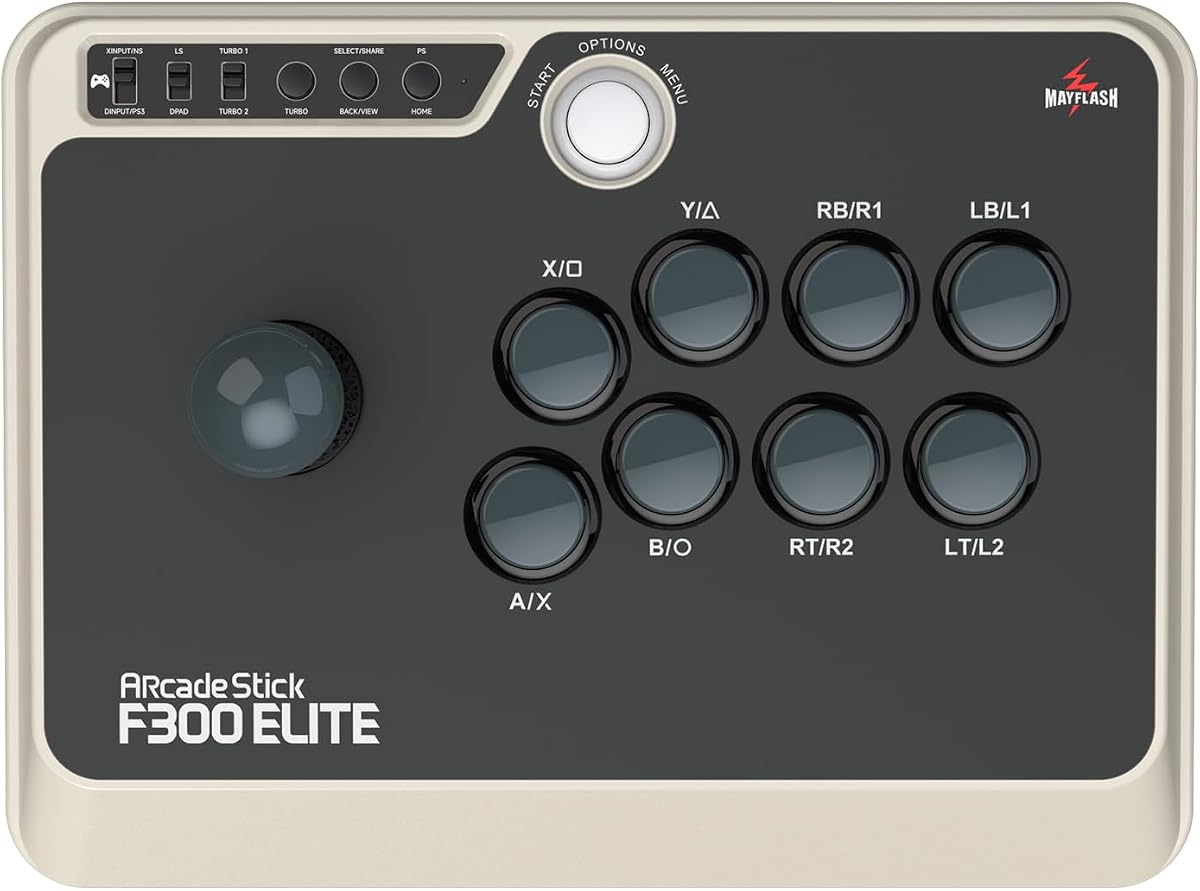
The MAYFLASH F300 Elite brings premium quality Sanwa components to fight stick enthusiasts with a 4.6 rating. It features nine highly responsive buttons and a precision 4-way joystick allowing reliable strikes instantly and surely game after game.
We may earn a commission when you buy through this link, at no additional cost to you.
Supporting XINPUT and DINPUT when used on PC makes it versatile for various game genres. The turbo support and modding access allow users to fully customize the platform to suit their playstyle.
While the F300 Elite is built for modding enthusiasts and fully tested before shipping the price is higher than standard models. This investment is justified by the superior build quality and durability of the included components.
Serious arcade gamers who demand peak performance and tactile feedback should choose this model. It delivers professional grade reliability while remaining accessible for Mac users looking for a quality experience.
Premium Sanwa parts ensure peak performance and longevity for intense competitive fighting game sessions.
The inside of the platform is accessible for further customization allowing you to swap buttons easily.
We may earn a commission when you buy through this link, at no additional cost to you.
The Thrustmaster SimTask FarmStick is a multifunction joystick designed specifically for Farming Simulator 25 on PS5 and PC. With a 3.7 rating it offers a true plug-and-play experience so you can jump straight into gameplay with no setup required.
We may earn a commission when you buy through this link, at no additional cost to you.
Its realistic 3-axis joystick allows for precise and smooth control when operating tractors and construction equipment. The HALL EFFECT MAGNETIC SENSORS eliminate drift and wear ensuring long-term precision for demanding farming and construction simulation gameplay.
While it features up to 33 programmable inputs for total control it requires a racing wheel for complete functionality. This limitation may restrict its utility for users seeking a standalone flight or general sim controller.
Simulation fans focused on farming or construction games will find the immersive and lifelike controls unmatched. The ambidextrous design offers flexible setups with racing wheels or dual joysticks to suit your playstyle.
Hall Effect magnetic sensors eliminate mechanical wear ensuring the joystick remains precise over years of use.
Buttons and switches manage every function without relying on a keyboard for better immersion.
We may earn a commission when you buy through this link, at no additional cost to you.
The 8Bitdo Ultimate 2 is a wireless controller for PC and Apple devices featuring TMR Joysticks for higher sensitivity. With a 4.5 rating it delivers an exceptionally stable 2.4G connection with ultra-low latency under 1ms ensuring rock-solid reliability.
We may earn a commission when you buy through this link, at no additional cost to you.
Customizable 6-Axis Motion Control and a 1000Hz Polling Rate provide enhanced control and faster response for competitive games. The controller includes a multifunctional charging dock and USB-C adapter for seamless connectivity and charging.
While it supports 2 pro back paddle buttons and extra bumpers for enhanced control the white finish may show wear over time. This is a minor trade-off compared to the superior performance and stability offered by the hardware.
Mac users needing a versatile and high-performance controller will find this model excels in precision and reliability. The exclusive wireless technology ensures strong anti-interference and a 10m range with virtually no lag.
Tunnel Magnetoresistance sticks offer greater precision and enhanced durability compared to standard analog sensors.
The ultra-low latency connection ensures your inputs are registered instantly for competitive gaming.
We may earn a commission when you buy through this link, at no additional cost to you.
The Moonag Wireless PC Controller features Hall Effect Joysticks that effectively prevent stick drift and wear with a 4.3 rating. It supports 1000Hz polling rate in both 2.4GHz wireless and wired modes providing ultra-fast response time.
We may earn a commission when you buy through this link, at no additional cost to you.
Dynamic RGB lighting around joysticks and buttons creates an immersive gaming atmosphere while the ergonomic design ensures comfortable long gaming sessions. The balanced weight and responsive buttons reduce fatigue during extended gameplay on your Mac.
While it supports Turbo Function and Macro Programming for rapid-fire actions and complex commands the RGB may drain the battery faster. This is acceptable given the dual vibration feedback and long playtime on a single charge.
Gamers prioritizing immersion and performance will appreciate the dual vibration and dynamic lighting features. The seamless device switching allows easy connection across PC and mobile systems.
Delivers smoother control and higher accuracy than traditional analog joysticks by eliminating mechanical friction.
Dynamic RGB lighting around joysticks and buttons creates a vibrant gaming atmosphere on your desk.
We may earn a commission when you buy through this link, at no additional cost to you.
The Logitech G X56 offers Military-grade Space and Flight Sim Precision with customizable options for aspiring combat pilots. With a 4.0 rating it includes a 189 programmable controls and hall-effect sensors for accurate aileron and elevator axis.
We may earn a commission when you buy through this link, at no additional cost to you.
The new Mini Analog Stick Control Surfaces help you navigate control sets with ease especially in VR where distinctions in button feel are crucial. RGB Backlighting allows you to set colors to match the rest of your gaming rig.
While it features a fully featured HOTAS with twin throttles and a 4-Spring System for adjustable stick force it requires significant desk space. Mac users should verify driver compatibility before purchase as system requirements are Windows focused.
Pilots and VR enthusiasts demanding precise and fully customizable controls will find this top-of-the-line system unmatched. It places controls perfectly under your fingers for subtle distinctions during complex simulations.
Accurate 16-bit axes and hall-effect sensors ensure the exact level of performance combat pilots demand.
Advanced 4-Spring System allows you to customize the resistance of the stick to match your preference.
We may earn a commission when you buy through this link, at no additional cost to you.
The SPEEDLINK Competition PRO EXTRA USB Joystick features a nostalgic design taken from the original Competition Pro's arcade machine stick. With a 3.9 rating it is perfect for arcade and retro games with an anniversary edition including a collection of 20 retro games for download.
We may earn a commission when you buy through this link, at no additional cost to you.
As a digital USB joystick for PCs and Android Devices it offers simple plug and play connectivity without complex setup. The design prioritizes retro authenticity with a straightforward layout that appeals to fans of classic arcade titles.
While it includes a games collection for download the build quality is basic and the buttons are digital rather than analog. This limits its utility for modern gaming but preserves the original feel of vintage arcade machines.
Retro enthusiasts and beginners seeking an affordable entry point into arcade gaming will find this edition charming. Its design is a tribute to the classics making it a great gift for nostalgic gamers.
The design is taken from the original Competition Pro's arcade machine stick capturing the essence of 80s gaming.
Includes games collection with 20 retro games for download providing immediate gameplay options.
We may earn a commission when you buy through this link, at no additional cost to you.
Selecting the right joystick for your Mac requires evaluating connectivity, build quality, and intended use cases to ensure a smooth gaming experience.
Wireless controllers offer freedom from cables but wired options reduce latency significantly. For Mac users Bluetooth or 2.4G dongles provide convenient connections while USB wired models ensure consistent input without battery concerns.
Prioritize low latency modes like 2.4G wireless if you play fast paced games on your Mac.
Check that the device explicitly supports macOS or offers universal drivers. Many flight sim and arcade sticks are Windows focused so confirming system requirements prevents compatibility issues on your Mac.
Ensure the product lists Mac OS or macOS support in its specifications before purchasing to avoid driver headaches.
Hall Effect or TMR sensors prevent stick drift and extend lifespan compared to standard potentiometers. These technologies provide precise control which is essential for flight simulators or competitive fighting games.
Invest in models with Hall Effect or TMR technology for durability and accurate input over time.
Materials like metal or high grade plastic ensure longevity while ergonomic grips reduce fatigue. A weighted base prevents unwanted movement during intense sessions which is critical for flight and racing sims.
Look for ergonomic shapes and quality materials that can withstand extended play sessions without discomfort.
Programmable buttons and turbo functions allow you to map complex commands for better gameplay flow. For flight sims having a high number of inputs helps manage systems efficiently without reaching for a keyboard.
Choose a joystick with customizable buttons or presets to streamline your control setup.
Determine whether you need a flight stick arcade stick or general controller. Flight joysticks offer specialized axes and throttle whereas arcade sticks prioritize rapid inputs and precision movement.
Select a device tailored to your specific genre such as flight or retro gaming.
Wireless controllers need sufficient battery life to avoid interruptions during gameplay. USB rechargeable models are preferable to disposable batteries for cost efficiency and environmental impact.
Check battery capacity and charging options to ensure long playtime without frequent recharges.
Access to mapping software and firmware updates allows you to optimize the joystick for different games. This ensures long term usability and better integration with your Mac ecosystem over time.
Prefer brands with active software support for firmware updates and macro mapping capabilities.
Connect your joystick to the Mac via USB or Bluetooth ensuring drivers are installed. Use the provided software to map buttons according to your preferred layout for optimal gameplay.
Store your controller in a cool dry place away from direct sunlight to prevent battery degradation. Keep ports clean from dust to avoid connectivity issues over time.
Regularly update firmware to benefit from performance improvements and bug fixes. Check battery levels before sessions to avoid sudden disconnections during critical gameplay.
Not all joysticks work seamlessly with macOS as many are Windows focused. Look for models that explicitly mention macOS compatibility or offer universal drivers for Mac systems.
Hall Effect joysticks use magnetic sensors to prevent stick drift and extend lifespan. Standard potentiometer sticks rely on physical contact which can wear out over time causing inaccuracies.
Yes but flight joysticks may lack standard buttons for action games. Ensure the model supports general input mapping if you intend to play non-simulation games.
Wireless controller batteries typically last between 15 to 20 hours on a full charge. Actual duration depends on usage of features like RGB lighting and vibration feedback.
A 2.4G USB dongle generally offers lower latency than Bluetooth. This makes it preferable for competitive gaming where input delay can affect performance.
Many models support button mapping via software available for macOS. Check if the manufacturer provides a Mac version of their configuration tool before purchasing.
We covered ten standout options ranging from the Hyperkin Trooper 2 for retro gaming to the Logitech G X56 for premium flight simulations. Each model serves specific needs whether you prioritize wireless convenience or precise tactile control.
Prioritize models with Hall Effect sensors or strong macOS support to ensure long term reliability. Flight sim enthusiasts should weigh the benefits of specialized axes versus general purpose controllers.
Check current availability and compatibility before finalizing your purchase to match your specific Mac model and gaming preferences. Staying informed ensures a smooth setup and immersive gameplay experience.