
VIVO Pneumatic Arm Quad Ultrawide
4.5Editor score
Supports up to 49 inch screens
Heavy duty cast aluminum construction
Pneumatic height adjustment
Finding the right 4 monitor mount with adjustable arms transforms your workspace into a powerhouse of efficiency. These stands elevate screens to eye level, reducing strain while freeing up valuable desk real estate for keyboards and documents.
We analyzed ten top rated models based on build quality, adjustability, and user feedback. Our list covers budget friendly options to heavy duty pneumatic systems designed for ultrawide setups and professional environments.
Each pick highlights unique strengths like gas spring arms or steel construction. Prices fluctuate frequently so check current listings before buying to ensure you get the best value for your specific multi monitor workstation needs today.
4.5Editor score

4.5Editor score

4.5Editor score
As an Amazon Associate we earn from qualifying purchases.
This side by side comparison helps you quickly identify the right 4 monitor mount with adjustable arms for your setup. We break down key specs like weight capacity and arm movement to simplify your decision.



The WALI Stacked 4 Monitor Mount stands out as a reliable solution for users needing four screens without breaking the bank. It holds up to 22 pounds per arm and fits most standard VESA patterns up to 27 inches. Its robust build ensures stability even during frequent adjustments throughout the workday.
We may earn a commission when you buy through this link, at no additional cost to you.
This mount offers impressive flexibility with plus 35 degrees of tilt and 90 degrees of swivel on each arm. The integrated cable management keeps wires hidden along the arms reducing visual clutter on your desk. It also supports both C clamp and grommet installation making it versatile for various desk thicknesses.
While it lacks pneumatic height adjustment the manual tension system works well for lighter setups. The extension reach is good but may not suit users who need screens far from the desk edge. However for most standard office setups this trade off is acceptable given the value.
We recommend this mount for professionals seeking a cost effective quad setup that maintains ergonomic standards. It frees up desk space effectively and supports smooth transitions between tasks. If you prioritize stability and affordability over advanced features this is an excellent choice.
Built in clips route cables neatly along the arms keeping your workspace tidy and reducing tripping hazards.
Choose between C clamp or grommet base to fit your desk thickness ranging from 0.2 to 3.62 inches.
We may earn a commission when you buy through this link, at no additional cost to you.
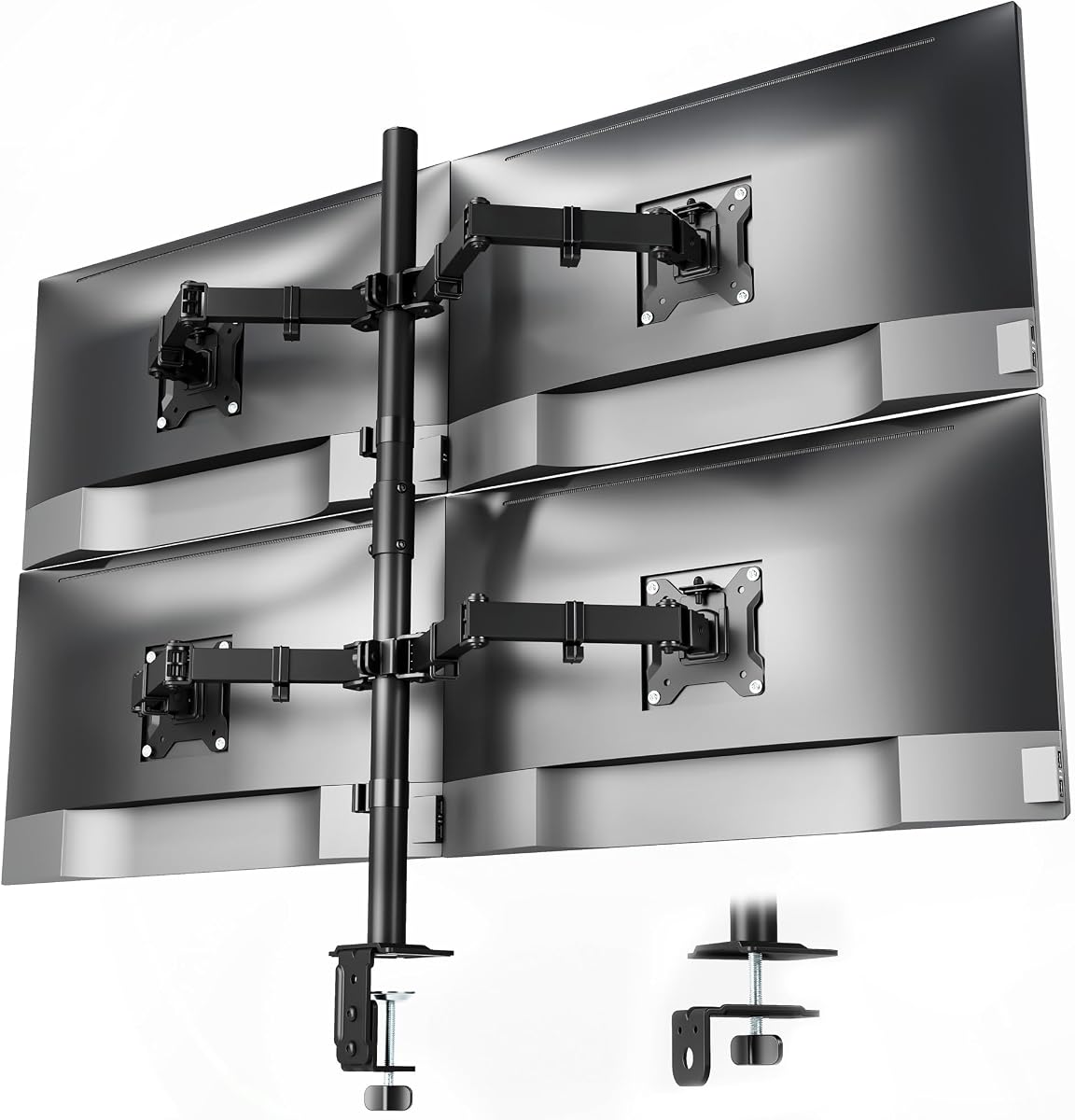
The VIVO Pneumatic Arm Quad Ultrawide is built for power users who demand support for large and heavy displays. It accommodates up to four 49 inch ultrawide screens with individual arm capacities reaching 44 pounds. The pneumatic mechanism lets you reposition monitors effortlessly with just a touch.
We may earn a commission when you buy through this link, at no additional cost to you.
Constructed from premium cast aluminum this mount offers exceptional scratch resistance and durability. Its heavy duty tilt joints prevent sagging even under significant weight. The detachable VESA plates simplify the mounting process ensuring secure attachment without complex tools.
The main drawback is the cost and the need for a robust desk to support the weight. Not every workstation can handle the stress of four ultrawides. But if you have the space and budget this mount delivers unmatched performance and longevity.
This is the ideal choice for trading desks or media centers where screen real estate is critical. The ability to adjust height smoothly reduces neck strain during long sessions. For those investing in high end monitors this stand is the only way to go.
Pneumatic arms counterbalance monitor weight allowing you to raise or lower screens with minimal effort at any time.
Cast aluminum construction ensures the mount remains sturdy and looks professional without showing signs of wear quickly.
We may earn a commission when you buy through this link, at no additional cost to you.
The MOUNT PRO 4 Monitor Mount proves you do not need to spend a fortune to get a functional quad setup. It supports screens up to 32 inches and offers a full range of motion including 360 degree rotation. Its simple design makes installation straightforward for most users.
We may earn a commission when you buy through this link, at no additional cost to you.
With an extra tall pole this mount reaches ergonomic heights easily whether you are sitting or standing. The integrated cable clips help keep wires organized preventing tangles that could disrupt your workflow. It fits most desks with a thickness between 0.59 and 3.15 inches.
The trade off is a lower weight limit which might exclude heavier ultrawide screens. Some components use plastic rather than all metal which may affect long term feel. Still for standard office monitors this provides reliable support at a fraction of the cost.
We suggest this model for students or home offices where budget is a priority. It frees up desk space and improves posture effectively. If your monitors are within the weight limit this is a fantastic entry point into multi monitor productivity.
The tall pole and flexible tilting allow you to position screens at eye level reducing neck and back strain significantly.
Labeled parts and clear manuals ensure you can assemble the mount quickly without needing specialized tools or extra help.
We may earn a commission when you buy through this link, at no additional cost to you.
The PUTORSEN Quad Monitor Mount is designed for users who want a large ultrawide on top with smaller screens below. This hybrid layout suits multitasking setups where one large reference screen is needed alongside secondary tools. Its heavy duty build supports up to 44 lbs on top.
We may earn a commission when you buy through this link, at no additional cost to you.
The 3 section arm design distributes weight evenly preventing sagging at the joints. Gas spring technology ensures that adjusting the height is smooth and effortless. You can also remove segments to reduce extension if you need a tighter setup near the wall.
Installation can be slightly complex due to the hybrid configuration requiring careful balancing of weights. Removing segments limits the reach which might not suit deep desks. However the versatility it offers makes it worth the extra effort for specific workflows.
This mount is perfect for traders or analysts who rely on a primary data screen plus secondary monitors. It keeps all screens accessible without cluttering the desk. If you need a custom layout this model provides the flexibility other stands cannot.
Remove one arm segment to reduce extension and bring monitors closer to the wall for a compact efficient workspace layout.
Advanced gas springs ensure monitors stay put in any position without drifting or requiring constant readjustment during use.
We may earn a commission when you buy through this link, at no additional cost to you.
The monTEK Quad Monitor Stand prioritizes stability through high grade materials and advanced joint design. It ensures displays remain securely in place without any risk of sagging even after adjustments. This makes it ideal for active workspaces where monitors are moved frequently.
We may earn a commission when you buy through this link, at no additional cost to you.
Each arm offers a wide tilt range from minus 45 to plus 45 degrees allowing precise glare control. The quick release VESA plates simplify attaching and detaching monitors making reconfigurations easy. Integrated cable organizers keep wires tidy and out of sight permanently.
While the assembly process might take a bit longer than average the result is a robust structure. The design is modern and sleek fitting various office aesthetics. Users will appreciate the balance of functionality and durability in this model.
We recommend this stand for professionals who need a reliable setup that lasts. It reduces eye strain by allowing optimal viewing angles and saves desk space. If stability is your top concern this mount delivers confidence in every movement.
Engineered joints lock firmly to eliminate any wobble or drift ensuring your screens stay exactly where you put them.
Attach and detach monitors easily without unscrewing everything each time saving time when switching equipment or cleaning.
We may earn a commission when you buy through this link, at no additional cost to you.
The MOUNTUP Quad Monitor Stand stands out with a 3 year warranty that provides long term peace of mind. It uses a solid base to support four arms keeping your workspace organized. The tilt and swivel options help you find the perfect ergonomic position easily.
We may earn a commission when you buy through this link, at no additional cost to you.
Installation is designed to be fast taking less than 20 minutes from box to use. The quick release VESA plates make attaching monitors straightforward without complicated steps. Cable clips are included to keep wires organized and protected from damage.
Users should note that cable management is basic and height adjustment requires manual sliding. These are minor issues compared to the reliability and support offered. The build quality ensures durability for daily use over many years.
We suggest this stand for buyers who value customer support and long term reliability. It fits standard monitors well and keeps desks clear for other tools. If you want assurance after purchase this model is a solid safe choice.
A unified base supports all four arms ensuring stability and reducing the need for multiple attachment points on your desk.
Clear instructions and pre labeled parts mean you can set up your full workstation in minutes without frustration.
We may earn a commission when you buy through this link, at no additional cost to you.
The VIVO Quad Pneumatic Monitor Mount uses dual side pneumatic arms to allow smooth transitions when adjusting height. This mechanism counterbalances the weight of your monitors so you can change positions effortlessly. It fits screens up to 32 inches with a capacity of 17.6 lbs each.
We may earn a commission when you buy through this link, at no additional cost to you.
The construction combines steel and aluminum for a sturdy frame that holds screens securely. You can increase or decrease tension to suit lighter or heavier monitors. Setup is straightforward with step-by-step instructions and hardware included to simplify assembly.
Because it uses pneumatic arms the stand is slightly heavier than spring versions. This might make placement a bit more challenging on lighter desks. However the fluid movement it provides makes it worth the extra weight for comfort focused users.
This model is perfect for those who adjust their screen height often throughout the day. It reduces physical effort and maintains ergonomic posture effectively. If smooth motion is a priority this mount delivers consistent performance for any workstation.
Pneumatic springs let you raise or lower screens with a gentle touch saving effort and maintaining consistent positioning.
Adjust tension settings to match your monitor weight ensuring the arms hold screens firmly without sagging or drifting.
We may earn a commission when you buy through this link, at no additional cost to you.
The Pholiten Quad Monitor Arm focuses on ergonomic design to improve posture and health for users. It uses gas spring technology to provide smooth and effortless positioning without straining your arms. The mount supports standard VESA patterns for compatibility with most major brands.
We may earn a commission when you buy through this link, at no additional cost to you.
Its design sandwiches the mount on the back of the table lifting screens off the surface to save space. The arm adjusts forward and backward so you can find the ideal distance from your eyes. This helps reduce eye strain during long hours of work.
Installation may require some patience due to potentially unclear instructions. You might need to experiment to get the tension right. Despite this the resulting workspace benefits and space savings make it a worthwhile investment for health conscious users.
We recommend this arm for anyone looking to optimize their desk for comfort. It allows vertical and horizontal viewing which aids multitasking. If you care about your long term health this setup promotes better habits while keeping your desk tidy.
Lifting monitors from the desk surface creates room for keyboard and documents improving organization and visual clarity.
Adjustable arms and rotation help you avoid fixed postures which reduces back and neck strain significantly.
We may earn a commission when you buy through this link, at no additional cost to you.
The WALI Quad Monitor Desk Mount has earned a high customer rating for its reliable performance. It supports screens up to 32 inches with a 22 lb capacity per arm. The two-stage locking system ensures both clamp and grommet options remain secure during use.
We may earn a commission when you buy through this link, at no additional cost to you.
This mount features a 31.5 inch height pole that lifts screens to comfortable viewing levels. Built-in cable management guides wires along the arms keeping cords out of sight. This helps create a tidy workspace and improves efficiency for any job.
Some users find routing cables can be tricky and assembly screws might be tight initially. These are minor issues that resolve once the mount is installed properly. Overall the benefits of desk space and ergonomics outweigh these small hurdles.
We suggest this mount for users who want a proven solution with strong support. It opens up space for notebooks and docking stations effectively. If you need a classic reliable setup this model is a trusted choice for many offices.
By freeing up desk space this mount allows you to work in a more comfortable position that reduces strain.
The two-stage locking system adapts to both clamp and grommet bases ensuring a secure hold on various desk types.
We may earn a commission when you buy through this link, at no additional cost to you.
The VIVO Quad Monitor 13 to 32 inch offers a traditional layout with a 3 plus 1 articulating design. It supports screens from 13 to 32 inches with a 22 lb capacity per arm. The longer upper bracket allows the top monitor to angle downward for easy alignment.
We may earn a commission when you buy through this link, at no additional cost to you.
This mount secures to surfaces up to 3.94 inches thick via a C-clamp or grommet. Cable clips are included to give the setup an organized appearance. It is ideal for security monitoring or team projects requiring multiple screens.
The tilt range is narrower at plus 15 to minus 15 degrees compared to others. You might need to adjust the mount base to get the perfect angle. Despite this the solid build and flexibility make it a strong option for varied use cases.
We recommend this stand for home offices needing a versatile multi screen setup. It improves multitasking capabilities by keeping monitors off the desk. If you need a reliable traditional design this model fits standard needs well without excess features.
The 3 plus 1 design lets you angle the top screen for better visibility in different work situations.
Included padding protects your desk surface from scratches during installation providing peace of mind.
We may earn a commission when you buy through this link, at no additional cost to you.
Choosing the right 4 monitor mount with adjustable arms requires understanding your desk space and monitor size. We break down key factors to help you select a stand that improves ergonomics and workflow.
Ensure the mount supports the size and weight of your specific screens. Most products fit VESA patterns like 75x75mm or 100x100mm but check your monitor specs before buying.
Always verify weight limits to avoid sagging.
Each arm has a specific weight limit ranging from 17 lbs to 44 lbs. Heavier screens need higher capacity to maintain stability without drooping over time.
Match the capacity to your heaviest monitor for safety.
Look for models offering full tilt swivel and rotation. Smooth movement helps reduce glare and allows you to share screens during meetings easily.
Prioritize models with gas or pneumatic springs for effortless adjustment.
Most mounts offer C-clamp and grommet holes. Check your desk thickness to ensure compatibility with the base options provided.
Choose the option that fits your desk structure.
Integrated clips or channels help keep wires tidy. A clutter free desk improves focus and prevents tangling that can damage cables.
Look for built-in routing features for a clean look.
Steel and aluminum frames provide better durability than plastic. Stronger materials ensure the stand remains stable over years of daily use.
Opt for metal construction for long term reliability.
Vertical stacking frees up room for keyboard and notes. Consider how much floor space you need for comfortable hand access.
Select a mount that maximizes your available workspace.
A solid warranty protects against defects. Look for brands offering at least one year of support for peace of mind.
Check return policies before finalizing your purchase.
Start by measuring your desk thickness and monitoring VESA patterns before assembly. Attach the base securely using the provided C-clamp or grommet hardware ensuring a tight fit.
Route your cables through the built-in clips as you attach monitors to prevent snagging. Adjust each screen to eye level and angle them slightly inward for comfortable viewing.
Regularly check all tightening knobs to maintain stability and prevent sagging over time. Dust the arms and base gently to keep moving parts functioning smoothly for years.
Most standard desks work fine as long as they are sturdy enough to hold the weight. Check the thickness specifications to ensure the clamp fits securely without slipping.
Yes most stands support curved screens as long as they meet the VESA hole pattern and weight limits. Verify the curve radius if your monitor is unusually shaped.
Installation typically takes 20 to 30 minutes with basic tools. Clear instructions and labeled parts help simplify the process for most users easily.
Lifting screens off the surface frees up nearly the entire footprint of the monitors. This creates space for notebooks and docking stations improving organization.
Yes most models allow height adjustments on the center pole or via pneumatic arms. This flexibility helps you adapt to different seating positions daily.
Many mounts accommodate mixed sizes within their range. Just ensure each arm supports the individual weight of its respective screen.
We reviewed ten top models ranging from budget friendly to heavy duty designs. Each option offers unique benefits for ergonomics and desk organization.
Prioritize weight capacity and movement quality to ensure long term comfort. The right stand can transform your productivity without breaking the bank.
Remember to check current pricing and availability as deals change often. Your ideal 4 monitor mount with adjustable arms is waiting to upgrade your workspace.