
ASRock 970A-G/3.1
4.2Editor score
AM3+ and AM3 CPU support
M.2 PCIe 2.0 slot
USB 3.1 and SATA 3
Compare the top ten ASRock AM3 motherboards for gaming and productivity in October 2026 with detailed reviews of chipset features socket compatibility and
Choosing the right AM3 motherboard can extend the life of your legacy AMD system. ASRock offers reliable options that balance performance and affordability for budget builders.
We evaluated ten models based on chipset capabilities expansion slots and connectivity. This guide highlights units supporting Phenom II and Athlon processors with modern upgrades.
Each pick shows real specifications and user ratings to help you decide. Note that availability and pricing fluctuate frequently so verify details before purchasing today.
4.2Editor score

4.0Editor score

3.8Editor score
The following table compares all ten selected models side by side to highlight key differences in chipset memory support and physical form factors.




This motherboard stands out as a robust choice for builders wanting modern I/O on legacy AMD platforms. It scores well with a 4.2 rating due to its versatile connectivity and stable chipset performance for daily tasks and gaming.
We may earn a commission when you buy through this link, at no additional cost to you.
Key strengths include the addition of M.2 support which allows for faster boot drives despite the DDR3 limitation. The inclusion of USB 3.1 Type-A and Type-C ports ensures peripheral compatibility with newer devices without needing expansion cards.
Trade-offs involve the reliance on DDR3 memory which caps total bandwidth compared to modern standards. Also the PCIe lanes are shared for CrossFire setups limiting multi GPU performance to entry level gains.
Buy this board if you are upgrading an existing AM3 system with a Phenom II X6. It balances cost and features effectively making it the top pick for value oriented retro builds.
The USB 3.1 and M.2 slots bridge the gap between old CPUs and modern storage needs.
Quad CrossFireX support lets you utilize multiple older GPUs for modest performance boosts.
We may earn a commission when you buy through this link, at no additional cost to you.
The 760GM-HDV is ideal for tight budgets needing a functional board for basic computing. With a high 4.3 rating it proves that reliable performance does not always require expensive chipsets or feature sets.
We may earn a commission when you buy through this link, at no additional cost to you.
Its integrated AMD 760G graphics allow for immediate use without a dedicated card making it perfect for office PCs. The MicroATX size fits into small cases while supporting CPUs up to 125W for headroom.
The lack of USB 3.0 is the main drawback for modern peripherals but SATA 2 and USB 2.0 suffice for older drives. Expansion is limited which restricts add-on cards but covers basic needs.
Choose this board for budget office builds or media centers where cost is the primary concern. It delivers stability and essential features without unnecessary extras that drive up the price.
Built-in Radeon HD 4250 graphics eliminate the need for a discrete GPU in basic setups.
The MicroATX layout ensures compatibility with smaller cases while maintaining essential connectivity.
We may earn a commission when you buy through this link, at no additional cost to you.
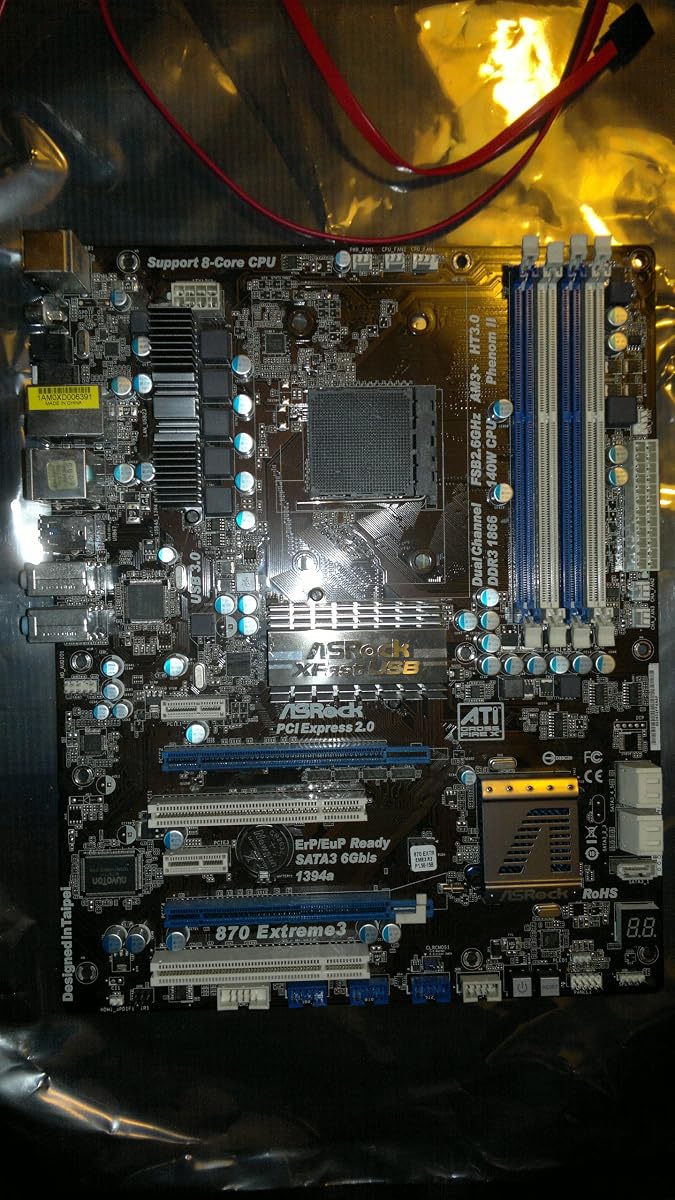
This top tier board is designed for enthusiasts pushing the limits of the AM3 platform with powerful CPU and GPU combinations. It offers the highest potential for legacy gaming systems needing maximum PCIe bandwidth.
We may earn a commission when you buy through this link, at no additional cost to you.
Key features include Quad SLI and CrossFireX support which is rare on budget boards. The 140W CPU support ensures stable overclocking for high end Phenom II processors which run hot and demand clean power.
Users might find the lack of USB 3.1 frustrating compared to newer boards and the size limits case choice. The older chipset can also be harder to source as stocks run low globally.
Invest in this board if you need a high performance foundation for a retro gaming PC. It maximizes the potential of legacy hardware ensuring your investment lasts longer with top tier support.
Multiple PCIe 2.0 slots allow for Quad SLI or CrossFire setups to boost frame rates.
Robust power circuitry keeps high wattage CPUs cool and stable during intense workloads.
We may earn a commission when you buy through this link, at no additional cost to you.
This MicroATX board delivers a balance of size and performance for small form factor builds. It scores 4.0 stars for its compact layout that still supports modern storage interfaces and multi GPU setups.
We may earn a commission when you buy through this link, at no additional cost to you.
The inclusion of SATA 3 and USB 3.0 is a major plus for a smaller board allowing fast data access. Quad CrossFireX capability means you can run two GPUs in a smaller case for better gaming.
Trade-offs include fewer PCIe slots for add-ons and limited USB headers for case fans. It is a niche choice that prioritizes case size over maximum connectivity for general users.
Buy this board for small gaming rigs using Phenom II CPUs. It fits in compact cases while providing the essential features needed for solid performance and expandability.
The MicroATX size saves desk space without sacrificing critical features like SATA 3 and CrossFire.
SATA 3 ports support modern SSDs making boot and load times much faster.
We may earn a commission when you buy through this link, at no additional cost to you.
This board targets users needing eSATA and RAID support for external storage arrays. With 5x SATA3 ports it is well suited for data management tasks where high throughput is required.
We may earn a commission when you buy through this link, at no additional cost to you.
Its chipset supports high speed memory which is beneficial for CPU intensive workloads. The layout is standard ATX making it compatible with most cases and cooling solutions available in the market.
Trade-offs include the absence of M.2 which limits boot drive options to SATA. Some users report mixed stability results compared to newer models with updated firmware support.
Choose this board if you need eSATA support for legacy external drives. It offers robust storage connectivity and reliable performance for workstation type environments.
The eSATA port provides fast external storage connections without relying on USB protocols.
RAID support allows for data redundancy and performance improvements across multiple drives.
We may earn a commission when you buy through this link, at no additional cost to you.
This board is a solid option for entry level builds needing a small footprint and low cost. It supports Phenom II CPUs and integrates graphics to eliminate the need for a dedicated GPU.
We may earn a commission when you buy through this link, at no additional cost to you.
Key strengths include the use of solid capacitors which improve durability under heat. The MicroATX size makes it easy to fit into budget cases while providing essential connectivity for daily use.
The lack of USB 3.0 is a limitation for modern external drives requiring higher bandwidth. While sufficient for basic tasks it may not satisfy users needing high speed peripheral connections.
Buy this board for simple office or home media systems. It balances essential features with a low price making it a practical choice for non-gaming applications.
Solid capacitors provide better longevity and stability for the CPU power delivery system.
The MicroATX size is ideal for compact desktops where space is limited.
We may earn a commission when you buy through this link, at no additional cost to you.
This model offers Hybrid CrossFireX technology which allows integrated graphics to work with a dedicated card. It provides a budget friendly way to boost graphics performance without buying a high end GPU.
We may earn a commission when you buy through this link, at no additional cost to you.
Key features include USB 3.0 and integrated video which makes it versatile for media and basic gaming. The SB710 chipset supports overclocking which adds value for enthusiasts on a budget.
Trade-offs include the lack of SATA 3 which limits SSD speeds. Some users report driver issues with the hybrid graphics mode making it less reliable than standard setups.
Choose this board if you want to experiment with Hybrid CrossFireX on a budget. It is a niche pick for those looking to extend the life of older hardware without major upgrades.
Hybrid CrossFireX allows integrated and discrete GPUs to work together for extra power.
USB 3.0 and integrated video offer modern connectivity and media capabilities at a low cost.
We may earn a commission when you buy through this link, at no additional cost to you.
This board brings high end features to a mid range price point making it attractive for gamers. It supports Quad CrossFireX and offers SATA 3 and USB 3.0 which are essential for storage and peripherals.
We may earn a commission when you buy through this link, at no additional cost to you.
The SB850 chipset provides a stable platform for high speed memory and CPU overclocking. It delivers reliable performance for gaming and productivity tasks without the cost of flagship boards.
Trade-offs include the reliance on PCIe 2.0 which limits bandwidth for modern GPU cards. The USB header count is also lower than premium boards limiting internal port expansion.
Buy this board if you need Quad CrossFireX support at a reasonable price. It delivers a balanced feature set that meets most user needs for legacy gaming builds.
Quad CrossFireX support allows two or more GPUs to work together for better gaming.
SATA 3 and USB 3.0 ensure that external devices and SSDs run at full speed.
We may earn a commission when you buy through this link, at no additional cost to you.
This board offers a unique mix of legacy support and modern connectivity features. It supports Phenom II X6 and Athlon II CPUs with Hybrid CrossFireX which boosts graphics performance efficiently.
We may earn a commission when you buy through this link, at no additional cost to you.
Key strengths include the inclusion of SATA 3 and USB 3.0 which makes it versatile for modern storage needs. The chipset provides a stable platform for basic gaming and general computing tasks.
Trade-offs include the older SB710 chipset which lacks advanced features found in newer boards. It is a niche choice for those who want hybrid graphics at a low cost.
Buy this board for budget hybrid builds using older CPUs. It delivers a mix of old and new tech that keeps costs low while providing solid performance.
Hybrid CrossFireX allows the onboard graphics to boost performance alongside a dedicated GPU.
SATA 3 and USB 3.0 provide modern data speeds without requiring expensive upgrades.
We may earn a commission when you buy through this link, at no additional cost to you.
This model stands out with a rare 5.0 rating and strong support for multiple GPU setups. It uses the powerful 890FX chipset to deliver stable performance and extensive connectivity options for enthusiasts.
We may earn a commission when you buy through this link, at no additional cost to you.
Key features include Quad CrossFireX and SLI support which is rare on AM3 boards. The 6x SATA3 ports allow for massive storage arrays making it ideal for media servers or workstations.
Trade-offs include the limited availability of AM3 CPUs which makes finding top tier processors hard. The price reflects its feature set but is higher than average options on the market.
Buy this board if you need maximum storage and GPU flexibility. It offers the best performance and reliability for AM3 builds that push the limits of hardware.
Quad CrossFireX and SLI support give you the power to run multiple GPUs efficiently.
With 6x SATA3 ports you can connect dozens of hard drives or SSDs easily.
We may earn a commission when you buy through this link, at no additional cost to you.
Selecting the right AM3 motherboard requires understanding your CPU needs and future expansion plans to ensure compatibility and value.
Chipsets like 990FX and 890FX offer the most features such as Quad SLI and SATA 3. Choose these for maximum performance while simpler boards like 760G suit basic tasks.
Match the chipset to your usage. Gamers need high end models while office users can save with lower tier boards.
Ensure the board supports your specific CPU model. Some boards support AM3+ only while others support both AM3 and AM3+ which matters for older Phenom II models.
Check the CPU support list to confirm compatibility before buying to avoid return issues.
AM3 boards use DDR3 memory which is slower than DDR4. Look for boards supporting high speed DDR3 to get the best performance from your CPU.
Prioritize boards with dual channel memory support to maximize data throughput for your applications.
ATX boards provide more expansion slots but MicroATX models fit smaller cases. Decide on your case size before selecting a board to ensure a proper fit.
Small form factor users should look for compact models that still offer necessary ports and features.
If you need multiple GPUs check for Quad CrossFireX or SLI support. Also consider the number of PCIe x1 slots for network cards or Wi-Fi adapters.
Ensure the board has enough slots for your planned upgrades and peripheral cards.
Modern storage relies on SATA 3 for SSDs. Avoid boards with only SATA 2 if you plan to use fast drives for your operating system.
Prioritize models with at least a few SATA 3 ports for better boot and load times.
USB 3.0 is essential for fast external drives. Avoid older boards that lack USB 3.0 or have very limited port counts on the rear panel.
Check the back panel for enough USB ports for your keyboard mouse and peripherals.
Powerful CPUs like the Phenom II X6 need strong VRMs. Look for boards with solid capacitors and good power phases to ensure stable performance.
Avoid cheap boards with weak power delivery if you plan to use high wattage CPUs.
Install the motherboard in a clean and static free environment. Use an anti static wrist strap to protect sensitive components from electrical damage.
Keep the system well ventilated to prevent overheating. Dust buildup on fans and heatsinks can reduce airflow and shorten the lifespan of your components.
Regularly update BIOS firmware if available to fix bugs and improve stability. Check the manufacturer website for any critical security patches.
No AM3 motherboards are not compatible with modern Ryzen processors. They were built for older Phenom II and Athlon II chips. You need a completely new system for current CPUs.
DDR3 RAM is becoming harder to find but can still be bought from third party sellers. Look for used deals or bulk lots to keep costs down for upgrades.
Only a few models like the 970A-G/3.1 support M.2 via adapters. Most AM3 boards rely on SATA 3 which is much slower for storage.
They can run older games well with a compatible GPU. However they lack modern support for new high performance graphics cards.
The AMD Phenom II X6 1100T is one of the fastest options. It works best on boards with strong power delivery like the 990FX models.
Yes Windows 10 runs on AM3 systems if you have the right drivers. Check if ASRock offers chipset drivers for your specific model.
Not for basic use as many boards have integrated graphics. However for gaming you will need a dedicated graphics card for decent performance.
You can check the BIOS version in the startup screen or using system info tools. Updates are usually available on the ASRock website.
We reviewed ten models to highlight the best options for legacy AMD builds. The 970A-G/3.1 offers the best mix of features and value for most users today.
Prioritize your needs whether it is gaming storage or general office work. Make sure the board supports your CPU and has the necessary ports for your workflow.
Prices and availability change frequently so check current listings before buying. Verify compatibility with your existing components to avoid issues during installation.