
WAVLINK USB 3.0/USB C to HDMI Universal Video Adapter
4.4Editor score
Supports up to 6 monitors
Universal USB 3.0 connection
Compact with LED status
This guide compares the top Displaylink Adapter models for Mac and Windows users, evaluating performance, compatibility, and value to help you choose the right
Finding the right Displaylink Adapter can transform a single-screen laptop into a powerful dual-monitor workstation. These adapters use advanced technology to bypass native video limits, allowing extended displays on Macs and PCs that typically support only one external screen.
We compared ten leading models based on video quality, port versatility, and system compatibility. Each product was evaluated for real-world productivity use cases, including office work, coding, and multitasking scenarios common in hybrid environments.
Each pick highlights specific strengths like charging power, port selection, or driver ease. Note that prices and availability change frequently, so verify current details before purchasing to ensure you get the best deal available today.
4.4Editor score

4.5Editor score

4.8Editor score
The following comparison table provides a side-by-side overview of all ten models, highlighting key specifications like resolution support, port types, and system requirements to help you quickly identify the best fit for your setup.



The Plugable USB-C & USB-A Dual 4K HDMI Adapter stands out as a top choice for professionals seeking reliable dual-screen capabilities. With a strong 4.5 rating, it delivers crisp 4K visuals at 60Hz, making it ideal for everyday productivity tasks like coding or spreadsheet work.
We may earn a commission when you buy through this link, at no additional cost to you.
Its flexible connectivity is a major advantage, allowing connection via USB-C or USB-A to suit various laptop generations. Powered by the DL-6950 chipset, it bypasses native video limitations on Macs and PCs without needing a dedicated external GPU or Thunderbolt port.
While it supports excellent extended modes, users should note that it does not support HDCP-protected streaming services like Netflix. Additionally, Windows users must install the DisplayLink driver, though this is a minor setup step for the added functionality.
This adapter is best for hybrid workers needing a dependable dual-monitor setup across different systems. Its lifetime North American support adds peace of mind, ensuring long-term reliability for business or home office deployments.
Use USB-C on modern systems or the included USB-A adapter for legacy laptops, ensuring compatibility across a wide range of devices without extra accessories.
Designed specifically for office apps, spreadsheets, and web browsing, this adapter maximizes screen real estate without compromising on visual clarity or stability.
We may earn a commission when you buy through this link, at no additional cost to you.
The WAVLINK USB 3.0/USB C to HDMI Universal Video Adapter offers impressive value for users needing multiple displays without breaking the budget. It supports up to six monitors on PCs, making it a scalable solution for complex workstations or multi-screen setups.
We may earn a commission when you buy through this link, at no additional cost to you.
Certified by DisplayLink and built with a USB 3.0 GPU, it ensures stable video output across Windows, MacOS, and ChromeOS. The compact form factor and LED status indicator provide easy visual feedback, while the external microphone and earphone ports add convenience for calls.
As a budget option, it requires driver installation and may not match the premium build quality of higher-end models. However, for basic office tasks and extended desktops, it delivers solid performance at a competitive price point.
This adapter is perfect for small businesses or individuals looking to expand their workspace affordably. Its broad system compatibility and multi-monitor support make it a versatile tool for those who prioritize flexibility over flashy features.
Supporting up to six monitors on a single PC allows for extensive workspace expansion, ideal for traders, analysts, or power users who need multiple windows open.
Compatible with Windows, MacOS, and ChromeOS, this adapter adapts to different IT environments, making it a safe choice for mixed device fleets.
We may earn a commission when you buy through this link, at no additional cost to you.
The ACASIS Dual DP DisplayLink Adapter is a premium choice tailored for MacBook Air and Pro users who demand high performance and reliability. With an impressive 4.8 rating, it effectively bypasses macOS single-screen limitations to deliver true extended desktop modes.
We may earn a commission when you buy through this link, at no additional cost to you.
Its dual DisplayPort outputs support 4K at 60Hz, providing sharp visuals for design work or multitasking. The integrated 100W PD charging keeps your laptop powered during long sessions, while three USB-A ports allow for immediate connection of mice and keyboards.
While the adapter uses DisplayPort rather than HDMI, requiring adapters for some monitors, the build quality is exceptional. The aluminum alloy design ensures heat dissipation and durability, making it a long-term investment for professional setups.
This adapter is best for Mac users seeking a seamless, high-quality docking experience. Its powerful DisplayLink technology ensures stable signals without flicker, making it ideal for video editing, coding, or conference room presentations.
The 100W PD port charges your notebook while driving displays, reducing cable clutter and ensuring your device stays powered during intense work sessions.
Built to solve native single-screen limits on M1-M4 Macs, this adapter is optimized for macOS, providing smooth, flicker-free extended displays.
We may earn a commission when you buy through this link, at no additional cost to you.
This ACASIS USB C to Dual HDMI DisplayLink Adapter combines dual 4K support with a compact, portable design. Rated 4.3, it transforms laptops into productivity hubs by enabling extended screens on both Mac and Windows systems.
We may earn a commission when you buy through this link, at no additional cost to you.
Key features include a 100W PD charging port to keep your device powered while working. The three USB-A ports connect peripherals effortlessly, and the aluminum design ensures the device stays cool even under heavy use.
Users should note that it is not suitable for gaming or HDCP content like Netflix. Driver installation is also required, but once set up, the adapter provides a stable, extended display experience for daily office tasks.
Ideal for commuters or hybrid workers, this adapter balances functionality with portability. Its dual HDMI outputs and charging integration make it a practical choice for those who need a reliable dual-screen setup on the go.
Supports two crystal-clear 4K monitors up to 60Hz, allowing for seamless multitasking across spreadsheets, documents, and browser windows.
The sleek aluminum hub is lightweight and compact, slipping easily into a laptop bag for travel between home, office, or coffee shops.
We may earn a commission when you buy through this link, at no additional cost to you.
The WAVLINK Hybrid 2-in-1 USB Cable DisplayLink Adapter offers versatile connectivity for both USB-C and USB-A systems. With a 4.4 rating, it delivers dual 4K displays at 60Hz, making it suitable for users with mixed device fleets.
We may earn a commission when you buy through this link, at no additional cost to you.
Its hybrid cable simplifies setup, allowing direct connection to Thunderbolt, USB-C, or legacy USB 3.0 ports. This flexibility is particularly valuable for organizations managing both modern and older hardware without needing separate adapters.
While it works well for productivity tasks, it does not support Linux, iOS, or HDCP content. However, for Windows and Mac users looking to expand their workspace, the adapter provides reliable performance and extended display modes.
This adapter is recommended for teams or individuals needing a universal dual-display solution. Its comprehensive system support and warranty coverage ensure confidence in deployment across various professional environments.
The 2-in-1 cable supports USB-C and USB-A inputs, ensuring you can use the adapter across generations of laptops without changing accessories.
Effortlessly mirror or expand screens to boost productivity, ideal for comparing data sets or keeping reference materials visible while working.
We may earn a commission when you buy through this link, at no additional cost to you.
The Plugable USB C to HDMI Adapter is designed specifically to beat native Mac display limits, allowing three total screens on base MacBook Air models. With a 4.3 rating, it adds two 4K 60Hz external displays via a single USB-C port.
We may earn a commission when you buy through this link, at no additional cost to you.
Mac users need to install the DisplayLink Manager and grant permissions, while Windows and ChromeOS systems enjoy plug-and-play functionality. This makes it a versatile choice for hybrid offices using both platform types.
HDCP-protected streaming apps like Netflix are not compatible, but productivity and coding apps work fully. The adapter is recognized by MacWorld for its reliability, making it a trusted tool for hybrid office setups.
This adapter is best for Mac users restricted to one external display natively. With lifetime support from a North American team, it provides peace of mind for IT deployments or home office upgrades.
Adds two external displays even on Macs with M1-M5 chips that normally support only one, effectively tripling your workspace without hardware changes.
Backed by Plugable's lifetime North American support, ensuring you get expert help whenever connectivity issues arise during daily use.
We may earn a commission when you buy through this link, at no additional cost to you.
The StarTech USB-A DisplayLink Dual 4K 60Hz DP Mini Dock is a compact solution for desktop users with limited space. Its small form factor and 1-foot attached cable make it perfect for under-desk setups or tight workstations.
We may earn a commission when you buy through this link, at no additional cost to you.
Featuring dual DisplayPort outputs and an integrated Gigabit Ethernet port, it provides both video and network connectivity. This is especially useful for laptops that lack built-in Ethernet or when USB-C ports are already occupied.
While limited to USB-A input, the dock supports a wide range of ultrabooks and Surface Pros. Automatic driver setup simplifies deployment, making it a reliable choice for corporate IT environments needing simple, effective connectivity.
This adapter is ideal for users prioritizing portability and network access. Its TAA compliance and DisplayLink certification ensure it meets enterprise standards for performance and security in hybrid office scenarios.
The mini dock fits easily in a pocket or laptop bag, ideal for business travelers who need quick setup in hotel rooms or meeting spaces.
An included Ethernet port provides stable network access, ensuring reliable internet speeds for video conferencing or large file downloads.
We may earn a commission when you buy through this link, at no additional cost to you.
This WAVLINK adapter stands out for its advanced DL-Chip encryption, offering enterprise-level data protection for sensitive operations. With a high 4.6 rating, it delivers crystal-clear dual 4K displays ideal for financial analysis or HD video conferencing.
We may earn a commission when you buy through this link, at no additional cost to you.
Compatible with Windows, MacOS, and ChromeOS, the adapter transforms any laptop into a dual-display workstation. The dual HDMI connectors support Thunderbolt 3/4 and legacy USB 2.0, providing extensive flexibility for various device types.
Driver installation is required, and it does not support Linux or iPad. However, for secure corporate environments, the encryption ensures data safety during daily operations, making it a trusted tool for professionals handling confidential information.
This adapter is recommended for businesses needing secure, high-performance dual-monitor setups. Its strong support team and warranty coverage ensure long-term reliability and quick resolution of any technical queries.
Equipped with encrypted DL-chip technology, this adapter ensures enterprise-level data protection for sensitive operations in corporate environments.
Delivers dual 4K at 60Hz for clear visuals in presentations or data analysis, ensuring your content looks sharp on modern monitors.
We may earn a commission when you buy through this link, at no additional cost to you.
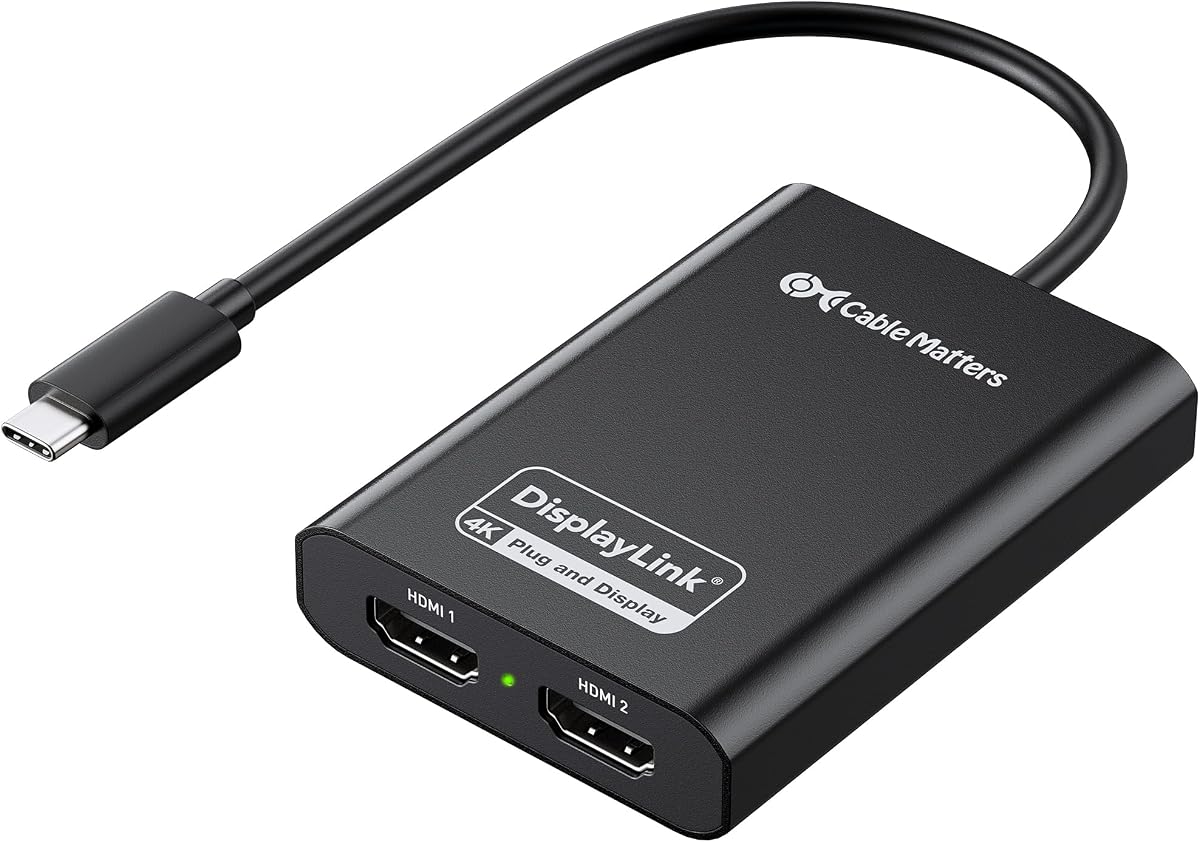
The Cable Matters USB C to Dual HDMI Adapter is a certified solution for users needing reliable dual-display support. With a 4.0 rating, it supports 4K at 60Hz and eliminates common 30Hz flicker issues found in non-DisplayLink adapters.
We may earn a commission when you buy through this link, at no additional cost to you.
Crafted with a durable aluminum housing, the adapter dissipates heat efficiently to maintain performance during long sessions. Mac users must install the DisplayLink Manager and allow Screen Recording permissions for proper functionality.
While performance varies based on CPU and memory, it is effective for creative workflows and productivity. The adapter is compact for travel but does not include HDMI cables, which should be considered when purchasing.
This adapter is best for users who prioritize build quality and certified reliability. Its dual HDMI outputs and support for Mac and Windows make it a solid choice for expanding workspace across different laptops.
The aluminum alloy enclosure ensures stable heat dissipation and long-term durability, making it suitable for everyday use and frequent travel.
Breaks single-display limits on many Mac laptops, allowing true dual 4K 60Hz extended modes for seamless multitasking freedom.
We may earn a commission when you buy through this link, at no additional cost to you.
The Sonnet DisplayLink Dual 4K HDMI Adapter connects two 4K displays to a single Thunderbolt or USB port on Mac and Windows computers. With a 4.4 rating, it is particularly well-suited for M1 or M2 Mac notebook users needing expanded workspace.
We may earn a commission when you buy through this link, at no additional cost to you.
It supports higher refresh rates up to 144Hz on lower resolutions and includes audio support, making it versatile for presentations and media work. The included USB-A to USB-C adapter enhances compatibility with older peripherals or legacy systems.
While it lacks additional ports like Ethernet, its focus on video performance is strong. The adapter enables you to open multiple applications on different displays, increasing productivity for developers, designers, or content creators.
This adapter is ideal for Mac users needing a straightforward dual-display setup. Its compatibility with M1, M2, and other Mac and Windows computers makes it a reliable tool for expanding onscreen work and play area.
Supports 1080p and lower resolutions at 144Hz for smooth visuals, providing flexibility depending on monitor capabilities.
Designed specifically for M1-M2 notebooks, ensuring seamless integration with macOS and reliable dual-screen performance for native users.
We may earn a commission when you buy through this link, at no additional cost to you.
Selecting the right Displaylink Adapter requires evaluating video resolution, port types, and system compatibility to match your specific workspace needs.
Look for adapters supporting 4K at 60Hz for crisp visuals. Ensure the adapter matches your monitor's capabilities to avoid flicker or lower frame rates.
Prioritize 4K 60Hz for productivity and smooth motion in general tasks.
Choose between USB-C, USB-A, or hybrid options based on your laptop ports. USB-C offers modern speed, while USB-A ensures compatibility with older machines.
Match the input type to your available laptop ports for seamless connection.
Most adapters need DisplayLink driver installation. Check OS compatibility and install software before use for proper functionality.
Ensure your OS supports drivers to avoid compatibility issues.
Aluminum alloy builds dissipate heat better. Compact, portable designs are ideal for travelers needing a lightweight solution.
Select durable materials to ensure long-term reliability during daily use.
Some adapters include Ethernet, USB data ports, or charging. These features reduce cable clutter and add versatility.
Consider multi-port options to minimize external peripherals needed.
Verify support for Windows, MacOS, or ChromeOS. Mac users often need specific permissions to allow screen recording.
Check system requirements to ensure the adapter works with your OS.
Lifetime or multi-year warranties offer peace of mind. Reliable support teams help troubleshoot issues quickly.
Choose brands with strong support to resolve technical problems efficiently.
Balance features with cost. Budget models lack extra ports but deliver solid core performance.
Invest in premium options only if advanced features are needed.
First, install the DisplayLink driver from the manufacturer's website. Restart your system to complete the installation process.
Connect the adapter to a powered USB or Thunderbolt port. Ensure all cables are secure to avoid intermittent display issues.
Avoid exposing the adapter to moisture or extreme heat. Store it in a cool, dry place when not in use to maintain longevity.
Most Displaylink adapters are optimized for productivity tasks like coding or office work. They generally do not support gaming or HDCP-protected streaming services like Netflix.
Yes, Mac users must install the DisplayLink Manager app and allow screen recording permissions for the adapter to function properly on macOS.
Some adapters support up to six monitors on Windows PCs. Check the product specs to confirm the maximum number of displays supported.
Yes, most models use HDMI 2.0 bandwidth to support 4K resolution at 60Hz. Verify this in the product specifications for confirmation.
Many models feature USB-C Power Delivery ports that support 100W charging. Ensure your specific model includes this feature before purchasing.
Linux support is limited or unavailable on many adapters. Always check system requirements before purchasing if you plan to use it on Linux.
We highlighted ten top models, ranging from budget-friendly options to premium Mac-specific docks. Each adapter balances features like port selection, charging power, and display resolution.
Prioritize your core needs like dual 4K performance, driver compatibility, and budget. Selecting the right tool ensures a seamless transition to a productive dual-monitor setup.
Always check current prices and availability before purchasing. Product details may change, so verifying the latest model information ensures you get the best value available today.