
MEKO Stylus Pen for Touchscreen
4.6Editor score
Value packed replacement tips
No battery required
Smooth silicone rubber tips
Discover the top-rated fine point stylus options for iPad and Android devices. This guide compares accuracy, durability, and features to help you choose.
Finding the right fine point stylus can transform how you interact with your touchscreen devices. Whether you are taking notes or drawing, precision matters.
We evaluated ten top-rated models based on tip accuracy, compatibility, and user feedback. Our goal is to highlight the most reliable tools for daily use.
Each pick below showcases unique strengths for different needs. Please note that prices and availability change frequently on retailer platforms.
4.6Editor score

4.5Editor score

4.2Editor score
This table provides a side-by-side view of the top ten stylus pens selected for their performance and value across various device types.


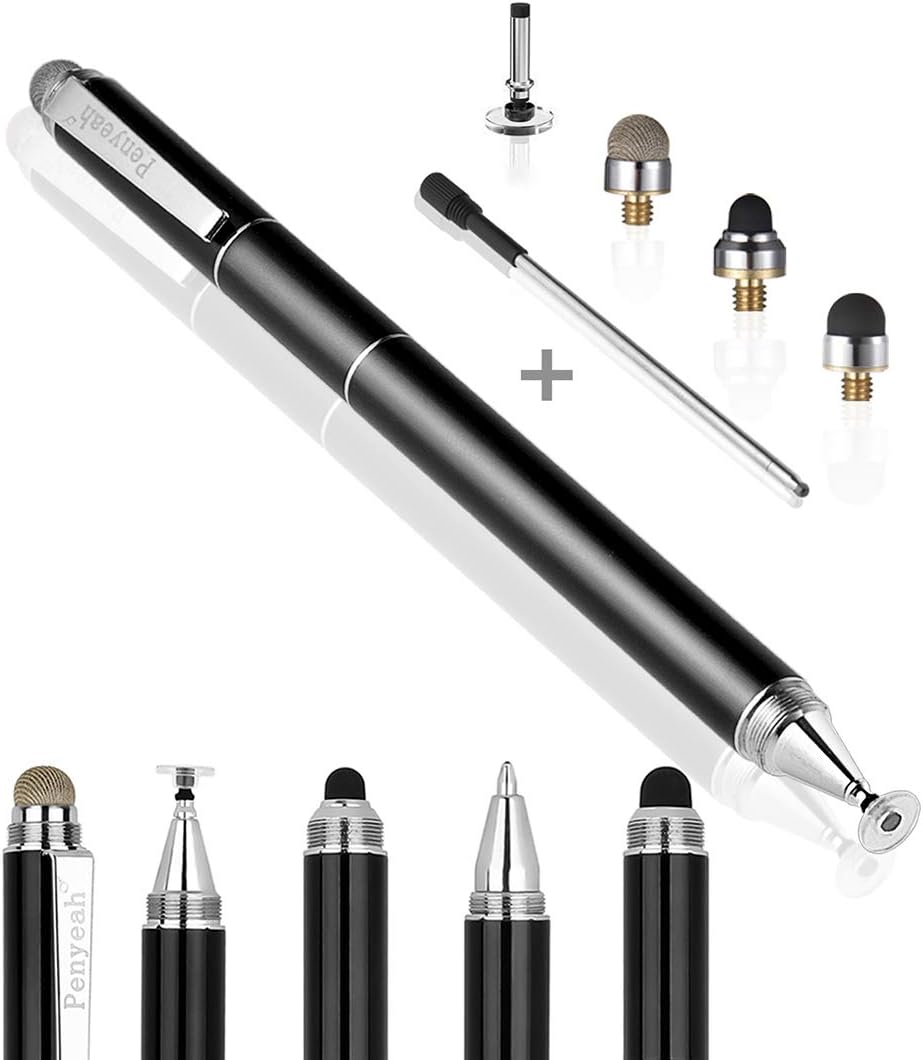


This versatile stylus offers three different tips to handle various tasks from precise writing to gaming navigation.
We may earn a commission when you buy through this link, at no additional cost to you.
The transparent disc tip is a standout feature allowing you to see exactly where your input is registered on the screen.
While it lacks battery powered features like palm rejection the mechanical simplicity ensures it works reliably on all capacitive screens.
Ideal for students and casual users seeking a reliable tool without the cost of active branded styluses.
The clear disc tip allows you to see the contact point which greatly improves accuracy for detailed tasks.
With rubber tips for scrolling and a disc for precision one pen handles all your daily touchscreen needs.
We may earn a commission when you buy through this link, at no additional cost to you.
Offering exceptional value this stylus comes with a generous supply of replacement tips to ensure long term usability.
We may earn a commission when you buy through this link, at no additional cost to you.
The dual rubber tips and disc tip combination provide a smooth experience across all major touchscreen devices.
It requires no charging or pairing making it a reliable backup pen that is always ready for immediate use.
Perfect for families or classrooms where durability and cost effectiveness are top priorities.
The package includes multiple replacements ensuring you never run out of tips even with heavy daily usage.
The silicone tips are soft and durable providing a comfortable writing experience that protects your screen.
We may earn a commission when you buy through this link, at no additional cost to you.
This active stylus bridges the gap between passive capacitive pens and high end branded options.
We may earn a commission when you buy through this link, at no additional cost to you.
The ultra fine tip delivers superior accuracy making it ideal for artists and professionals needing exact control.
Although it requires periodic charging the battery life is robust enough for extended creative sessions.
Recommended for users who want enhanced performance without investing in brand specific proprietary hardware.
The active tip technology minimizes lag and improves precision significantly compared to standard rubber tips.
Enjoy eight hours of continuous use on a single charge which covers most daily workflows.
We may earn a commission when you buy through this link, at no additional cost to you.
This stylus stands out with its magnetic design that attaches securely to the side of compatible iPads.
We may earn a commission when you buy through this link, at no additional cost to you.
You can quickly activate it with a one touch switch and charge it fully in just forty minutes.
It delivers a lag free experience for writing and drawing though it is best suited for specific iPad models.
Great for users who value convenience and easy storage with their tablet.
The magnetic adsorption keeps the stylus attached to your device preventing loss and keeping it ready.
A quick forty minute charge provides up to ten hours of usage reducing downtime significantly.
We may earn a commission when you buy through this link, at no additional cost to you.
Designed for general active use this pen powers on instantly without needing Bluetooth pairing.
We may earn a commission when you buy through this link, at no additional cost to you.
It features a consistent 1.5mm tip that provides a realistic writing feel across various devices.
The battery lasts for over ten hours on a short charge making it reliable for long days.
Suitable for professionals who need a dependable tool for notes and sketches.
Turn the pen on within one second allowing for immediate access when inspiration strikes.
With a ten hour runtime and two hour charge time it minimizes interruptions to your workflow.
We may earn a commission when you buy through this link, at no additional cost to you.
This stylus integrates a real ballpoint pen with digital touch options for maximum utility.
We may earn a commission when you buy through this link, at no additional cost to you.
You can switch between mesh fiber rubber and disc tips depending on the task at hand.
The metal body adds durability and a premium feel compared to plastic alternatives.
Perfect for users who want a single pen for both physical and digital note taking.
The ink pen refill allows you to write on paper while the stylus tips handle digital screens.
Mesh fiber and disc tips offer varied precision levels for different apps and uses.
We may earn a commission when you buy through this link, at no additional cost to you.
With an upgraded chip this stylus works reliably on newer iPad generations without Bluetooth complications.
We may earn a commission when you buy through this link, at no additional cost to you.
The fine tip ensures detailed work is accurate while the lightweight design reduces hand fatigue.
Auto shutdown protects the battery ensuring it is ready when you need it again.
A solid choice for artists looking for precision without high costs.
The ultra fine tip allows for intricate sketching and precise UI interactions.
Auto shutdown saves power so the pen stays ready for your next creative session.
We may earn a commission when you buy through this link, at no additional cost to you.
This six pack provides enough styluses for an office or family to share easily.
We may earn a commission when you buy through this link, at no additional cost to you.
The fine point design is responsive and durable making it suitable for daily navigation.
Built-in clips make it easy to attach to notebooks or pockets for portability.
An efficient choice for group environments where multiple pens are needed.
Multiple color options allow each user to identify their own stylus easily.
The clip ensures the stylus is always ready for use whether at desk or on the go.
We may earn a commission when you buy through this link, at no additional cost to you.
This set offers four styluses with twelve replacement tips ensuring you are prepared for any situation.
We may earn a commission when you buy through this link, at no additional cost to you.
The aluminum barrels provide a comfortable and sturdy feel that is pleasant to hold.
High sensitivity tips make navigation and writing smooth across all capacitive screens.
Ideal for schools or offices needing reliable backup tools for multiple devices.
With twelve replacement tips included you can keep these styluses in use for years.
The aluminum barrel offers a premium feel that makes writing comfortable over long periods.
We may earn a commission when you buy through this link, at no additional cost to you.
This ten pack is an excellent resource for businesses or classrooms requiring many pens.
We may earn a commission when you buy through this link, at no additional cost to you.
Each stylus has dual rubber tips for versatility and an aluminum body for durability.
They provide scratch protection for your devices and are ready to use out of the box.
A cost effective solution for equipping multiple people with reliable styluses.
Buying in bulk reduces the cost per unit significantly compared to single purchases.
The aluminum body makes these feel like premium tools rather than disposable accessories.
We may earn a commission when you buy through this link, at no additional cost to you.
Selecting the right stylus involves evaluating several key factors to ensure compatibility and usability.
Different styluses offer rubber mesh or disc tips. Disc tips provide higher visibility and precision while rubber tips offer a soft feel.
Choose disc tips for drawing and rubber tips for general navigation.
Ensure the stylus works with your specific device model. Most capacitive styluses work universally but active pens may have restrictions.
Always check product descriptions to confirm support for your iPad or Android tablet.
Passive styluses do not need power while active ones require charging. Passive are always ready but active offer better features.
Decide based on whether you prefer convenience or advanced functionality.
Tips wear down over time so check if replacements are included or easy to find.
Look for models that offer extra tips to extend the life of your stylus.
A comfortable grip reduces fatigue during long sessions. Consider weight and barrel material when choosing.
Aluminum barrels often feel more durable and comfortable than plastic.
Most affordable styluses do not support palm rejection meaning your hand may interfere.
If you rest your hand on the screen often consider active models or specific apps that support this feature.
Budget options under ten dollars are effective for basic needs while premium models cost more.
Assess if features like charging or active technology justify the higher cost for your use case.
Multi-pack bundles offer better value for families or offices. Check how many styluses and tips are included.
Bundles ensure you always have a backup pen available when one wears out.
Start by ensuring your screen is clean before using a stylus to prevent dust from scratching the display.
If you are using a stylus with interchangeable tips twist the barrel to swap tips based on your current task.
Store your stylus in a protective case or pocket to prevent damage to the tips and body.
Most fine point styluses are capacitive and do not require Bluetooth pairing. They work by sensing the touch of your finger through the tip. Only active styluses with special features might need Bluetooth but these are rare in the budget category.
Most capacitive styluses work with any touchscreen device including iPads and Android tablets. However active styluses may have specific model requirements so always check compatibility lists before purchasing.
Yes rubber and mesh tips will eventually wear down from friction. This is normal so look for styluses that come with spare tips or allow easy replacement to maintain performance.
Passive styluses use your finger capacitance and need no power while active styluses use batteries for extra features like palm rejection or pressure sensitivity.
Yes most styluses work fine with screen protectors. However the added thickness may slightly affect the writing feel or require slight adjustment to pressure.
High quality styluses with soft rubber or mesh tips generally do not scratch screens. Avoid using metal tips without protection to prevent potential damage.
Replace tips when they become jagged or stop responding smoothly. With normal use this might be every few months depending on usage intensity and screen texture.
The top picks cover a wide range of needs from budget bundles to precision active pens.
Prioritize tip type and compatibility to ensure the stylus works seamlessly with your device.
Always verify current availability and pricing before making a final decision.