
Keychron Q6 Pro
4.1Editor score
Full aluminum wireless build
QMK VIA programmability
Gasket mounted design
Explore our top picks for full metal keyboard options including durable aluminum frames and premium switches for gaming and office productivity.
Finding a full metal keyboard means seeking durability and a premium feel that stands up to intense daily use. These keyboards often feature aluminum frames that reduce flex and provide a solid typing experience for both gamers and professionals alike.
We compared ten leading models based on build quality, switch type, and unique features like RGB lighting or OLED screens. Our analysis focuses on how each keyboard balances performance with comfort to help you make an informed choice for your setup.
Each pick showcases key strengths and trade-offs so you can match a keyboard to your specific needs and budget. Keep in mind that prices and availability can change over time so checking current listings is always wise before purchasing.
4.1Editor score

4.8Editor score
4.2Editor score
This side-by-side comparison highlights the core specifications and unique selling points of each full metal keyboard to help you find the perfect fit for your desk.



The OOCTPK Chilkey SF60 stands out as a top contender in the full metal keyboard category with its aerospace grade aluminum construction and advanced magnetic switches. It achieves a high user rating and delivers a premium typing experience that appeals to serious gamers and enthusiasts.
We may earn a commission when you buy through this link, at no additional cost to you.
Its standout feature is the rapid trigger precision enabled by WS Flux Poseidon switches which allow for instant actuation and release. This technology combined with an 8000Hz polling rate ensures minimal latency for competitive gaming while the metal keycaps create a unique thock sound profile.
While the keyboard offers incredible performance the 60% layout means you lose dedicated arrow keys and a numpad which may not suit everyone. Additionally the price is higher than many entry options and features some require time to configure properly.
This keyboard is ideal for users who want a compact high performance device with a premium feel. It is a strong recommendation for gamers seeking speed and those who appreciate the durability and sound of an all aluminum build.
The Hall Effect switches use magnetic sensors instead of physical contact to reduce wear and provide adjustable actuation points for personalized typing.
The CNC machined case and metal keycaps work together to form an acoustic chamber that enhances the sound quality of every keystroke.
We may earn a commission when you buy through this link, at no additional cost to you.
The SteelSeries Apex 5 combines a sturdy aircraft grade aluminum frame with hybrid mechanical membrane switches for a unique typing feel. It features an OLED smart display that can show game stats and messages adding significant utility for multimedia users.
We may earn a commission when you buy through this link, at no additional cost to you.
Its RGB illumination is vibrant and dynamic allowing for reactive lighting effects that enhance the gaming setup aesthetic. The included magnetic wrist rest provides comfort during long sessions and the aluminum frame ensures the board stays stable under pressure.
Some users find the hybrid switches less satisfying than pure mechanical options due to the membrane layer. The OLED display is useful but requires software integration to maximize its potential which adds setup steps.
This keyboard is best for gamers who want visual feedback on their keyboard and a solid build. It is a good choice if you value the OLED display for streaming or gaming stats and want a comfortable typing experience with wrist support.
The screen allows you to customize with gifs and Discord messages keeping you informed without switching windows.
Blending tactile click with membrane smoothness this switch type aims to offer durability and unique feedback.
We may earn a commission when you buy through this link, at no additional cost to you.
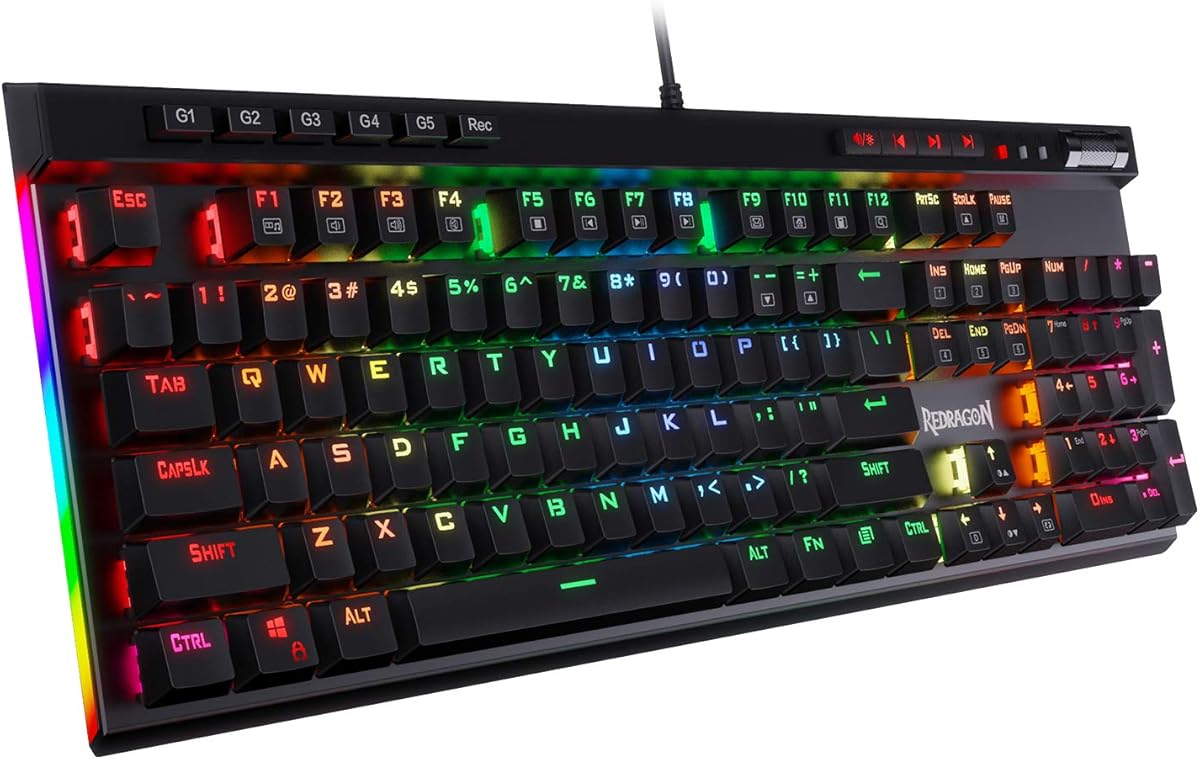
The Redragon K556 offers a robust aluminum build at a very accessible price point making it a top choice for budget conscious shoppers. It provides a solid typing experience with brown switches and a full 104 key layout suitable for office and gaming use.
We may earn a commission when you buy through this link, at no additional cost to you.
Its brushed aluminum board prevents wobbling and flex which is rare at this price level. The keyboard supports hot swapping switches without soldering and it comes with vibrant RGB lighting modes that add a gaming vibe to your desk.
While the software is functional it lacks the depth of more premium brands for complex macro programming. Some versions may have limitations on switch swapping so checking the specific batch details is advisable before buying.
This is an excellent entry level metal keyboard for those who want durability without breaking the bank. It is perfect for users who prioritize a sturdy frame and want the flexibility to customize switches later.
A tank solid board keeps keystrokes steady and provides a premium feel usually found in expensive boards.
The upgraded sockets allow you to try different switches easily to find the perfect feel.
We may earn a commission when you buy through this link, at no additional cost to you.
The Keychron K10 HE brings advanced Hall Effect magnetic switches to a wireless full size form factor. It allows for rapid trigger functionality which is highly valued in competitive gaming and offers flexible connectivity across multiple devices.
We may earn a commission when you buy through this link, at no additional cost to you.
Its tri mode connectivity includes Bluetooth 5.2 and 2.4 GHz wireless for stable performance without cables. The design features wood sidings that add a refined aesthetic and the hot swappable switches let you customize the feel without soldering.
The price is higher than traditional mechanical keyboards and the launcher configurator requires some technical setup to unlock full features. Battery life depends on usage and RGB brightness so heavy use may need frequent recharging.
This keyboard is ideal for users who want a wireless solution with cutting edge gaming tech. It is a great fit for those who appreciate a premium look and need the flexibility of switching between devices seamlessly.
Adjustable actuation points allow you to set sensitivity for faster response in games.
Dedicated keys and layout options make it easy to use with Mac Windows and Linux.
We may earn a commission when you buy through this link, at no additional cost to you.
The Keychron Q6 Pro is a fully customizable wireless keyboard built with a premium aluminum body and gasket mounting. It supports QMK VIA software allowing you to remap keys and create macros with a high degree of control for any workflow.
We may earn a commission when you buy through this link, at no additional cost to you.
Its double gasket design and PBT keycaps provide a comfortable and durable typing experience that reduces noise and resonance. The hot swappable sockets mean you can change switches to tweak the feel without needing soldering skills.
The complexity of VIA software may be overwhelming for casual users who prefer simple plug and play setups. The high price point also places it as a niche choice for enthusiasts willing to invest in customization.
This keyboard is best for power users who need deep customization and a premium wireless experience. It is a strong recommendation for those who want full control over their layout and value a high quality aluminum build.
You can map any key and create macros for any operating system with open source flexibility.
Silicone pads between cases reduce metal resonance for a softer and more satisfying typing feel.
We may earn a commission when you buy through this link, at no additional cost to you.
The Corsair Vanguard 96 delivers a 96 percent layout that packs a full keyboard into a compact frame. It features an integrated LCD screen and rotary dial that provide quick access to system info and settings without extra tools.
We may earn a commission when you buy through this link, at no additional cost to you.
Its 8000Hz polling rate ensures extremely fast response times for gaming while the MLX linear switches offer a smooth and quiet typing experience. The keyboard includes G-keys that can be mapped to Stream Deck functions for enhanced productivity.
The tight spacing between keys may take time to adjust to for those used to larger layouts. The reliance on software for customization means you need the iCUE app to access many of its advanced features.
This keyboard is perfect for users with limited desk space who still need a numpad and arrow keys. It is a great choice for streamers who want virtual Stream Deck functionality directly on their keyboard.
Programmable G-keys let you map commands for apps and games easily.
The luminous screen shows animations and system specs for a futuristic feel.
We may earn a commission when you buy through this link, at no additional cost to you.
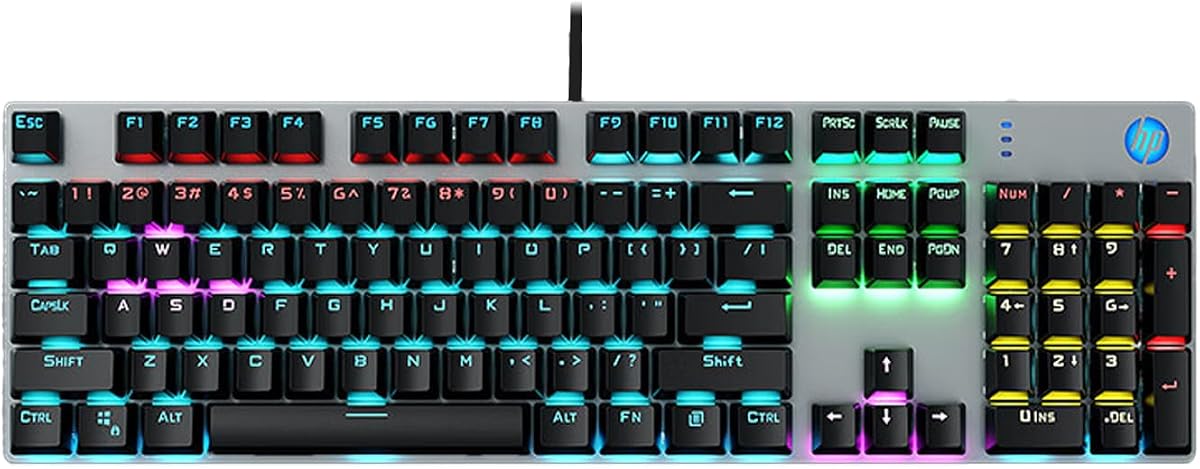
The HP GK400F is a reliable wired mechanical keyboard with a sturdy metal panel that ensures stability during typing. It features tactile brown switches that are suitable for both office work and casual gaming without the loud click of blue switches.
We may earn a commission when you buy through this link, at no additional cost to you.
Its ice blue backlight offers clear visibility in low light conditions and the anti-slip design keeps the keyboard secure on your desk. The double-shot ABS keycaps ensure the legends remain clear even after long periods of use.
ABS keycaps tend to develop shine over time compared to PBT so they may not look new for years. The backlighting is functional but lacks the RGB customization options found on gaming focused models.
This keyboard is ideal for office users who want a professional look and a solid typing feel. It is a good choice for those who prioritize reliability and comfort without needing advanced gaming features.
The sturdy metal panel provides a stable structure for comfortable typing in any workspace.
Brown switches offer a soft tactile bump that is noticeable but not distracting.
We may earn a commission when you buy through this link, at no additional cost to you.
The Cherry KC 200 MX is a wired mechanical office keyboard featuring improved MX2A brown switches for a precise typing experience. Its anodized metal plate adds durability and a professional look to any workspace setup.
We may earn a commission when you buy through this link, at no additional cost to you.
With over 100 million actuations per key the keyboard is designed for long term use without wear. The status LEDs and dedicated access keys for calculator and volume make it practical for productivity tasks.
It offers less customization than gaming keyboards with no RGB or programmable macros which may limit power users. The design is simple and functional but may not stand out for a flashy setup.
This keyboard is best for professionals who value reliability and a clean typing feel. It is a great choice for office environments where durability and consistency are more important than RGB lighting.
Cherry switches are known for their high quality and consistent performance over time.
Special keys for volume and calculator allow quick access without complex key combinations.
We may earn a commission when you buy through this link, at no additional cost to you.
The Logitech G413 SE features a robust brushed aluminum magnesium alloy top case that minimizes flex and provides a sturdy typing platform. It includes PBT keycaps which are heat and wear resistant for long term durability.
We may earn a commission when you buy through this link, at no additional cost to you.
Its tactile mechanical switches deliver a crisp feel and the white LED lighting is bright enough for low light use. The keyboard offers 6 key rollover anti-ghosting to ensure accurate input during fast gaming actions.
The lighting is fixed to white which limits customization for those who prefer RGB colors. It also lacks some advanced features like full programmable keys which might be needed for complex workflows.
This keyboard is perfect for gamers and users who want a reliable and well built device. It is a solid recommendation for those who value PBT keycaps and a metal frame without needing flashy lighting.
PBT material resists shine and wear so your keys stay looking good for years.
The aluminum magnesium alloy serves as a strong backbone to reduce body flex.
We may earn a commission when you buy through this link, at no additional cost to you.
The Redragon K580 includes dedicated macro keys and a media wheel for easy control without software. It features hot swap sockets and durable keycaps that can withstand heavy daily use and gaming sessions.
We may earn a commission when you buy through this link, at no additional cost to you.
Its blue switches provide distinct tactile and audible feedback which is great for typing but may be loud for shared spaces. The keyboard supports plug and play operation for basic use and optional software for advanced users.
The blue switches may be too loud for some office environments and the software is not required for most functions. Limited RGB customization compared to premium models is another trade-off for the low price.
This keyboard is ideal for users who want easy access to macros and media controls. It is a good choice for budget conscious gamers who value physical controls and a durable build.
Save combos directly on the keyboard without needing external software to record them.
The media wheel allows quick volume control and playback functions on the fly.
We may earn a commission when you buy through this link, at no additional cost to you.
Selecting a full metal keyboard involves considering build materials switch types and extra features to match your specific needs.
Full metal keyboards typically use aluminum alloys to reduce flex and improve durability. Look for frames made from 6063 aluminum or brushed aluminum for a premium feel and better heat dissipation.
A sturdy metal construction ensures the keyboard remains stable during intense typing or gaming sessions.
Mechanical switches like tactile or clicky provide feedback while magnetic switches offer rapid trigger for gaming. Choose based on whether you prioritize typing comfort or gaming speed.
Ensure the switches are durable with a high life rating such as 50 million or 100 million actuations.
Full size layouts offer all keys including a numpad while 60% models save desk space. Consider your workflow to decide if you need arrow keys or a numpad.
Compact layouts are great for minimalism but may require layers to access missing keys.
Wired connections offer stability while wireless provides flexibility. Some keyboards offer tri mode connectivity including Bluetooth and 2.4 GHz for versatility.
Choose wired for gaming to reduce latency and wireless for a cleaner desk setup.
Hot swappable boards allow you to change switches without soldering. This feature adds flexibility to customize feel and sound over time.
Look for boards that support 3 pin and 5 pin switches for wider compatibility.
Software like QMK VIA or brand specific tools allow remapping keys and macros. Powerful software adds utility but requires setup time.
Decide if you want deep customization or simple plug and play usage.
PBT keycaps resist shine and feel better over time compared to ABS. Double-shot legends ensure text remains visible long term.
Invest in a keyboard with quality keycaps to ensure a better typing experience.
RGB lighting adds aesthetic appeal while OLED or LCD displays can show system info. These features enhance utility and gaming ambiance.
Consider if these features justify the added cost for your use case.
To maintain your metal keyboard keep it free from dust using a soft brush or compressed air. This prevents debris from affecting switch performance over time.
Clean the keycaps regularly with a damp cloth to remove oils and dirt. Avoid harsh chemicals that might damage the metal finish or keycap legends.
Store the keyboard in a dry place to prevent corrosion of the metal components. Using a dust cover when not in use will extend its lifespan significantly.
Yes full metal keyboards offer superior durability and a premium typing feel. They reduce flex and look better on a desk compared to plastic models making them a solid investment for long term use.
Metal keyboards can amplify sound leading to a louder typing experience. However dampeners or gasket mounts can help reduce this resonance for a quieter feel.
Tactile switches like brown are versatile for work and gaming. Linear switches are preferred for gaming while clicky switches suit typing enthusiasts.
Many metal keyboards support hot swapping and programmable software. This allows you to change switches and remap keys to fit your preferences.
Yes several modern metal keyboards offer Bluetooth and wireless modes. Ensure you check battery life and latency for your specific needs.
Use a microfiber cloth and mild cleaner to wipe the metal frame. Avoid excessive moisture and use compressed air to remove dust from switches.
We have reviewed ten top models including the OOCTPK Chilkey SF60 and Keychron Q6 Pro which offer standout features for enthusiasts and professionals.
Prioritize build quality and switch type based on your primary use case to ensure satisfaction. A metal frame adds value but the switch experience defines daily usability.
Remember that prices change often so check the current listings for the best deals before making your final purchase.